Informa helps businesses and professionals in hundreds of ways.

Our international portfolio of live events, world-leading research publications, and innovative digital services provide specialists with the knowledge and connections they need to thrive.

This is the optional Alert Banner in the Header. It can also be placed below the Navigation.

Core Site Builder 2.0 - Releases

 22 October 2026 
New Features
  1. Bulk Publish for Event Sites - Time Saver!

    Authors can now publish multiple pages at once using the new Bulk Publish option on the Site Builder page.

    Located below the Page Groups and Landing Pages table, the Bulk Publish button opens a list of pages with unpublished changes. Authors can select individual pages, multiple pages, or all listed pages and publish them in one go.


  2. List Module – New Styling Options

    The List module now offers additional styling options, giving authors more control over the appearance of their lists.

    For a demo, click here.

    - Number and Text Bullet Styling: Customise the styling of numbered lists and text bullets.

    - Line Separator Colour: Control the colour of line separators within the module.

Fixes and Improvements
  1. Table Module - Improved Authoring Experience

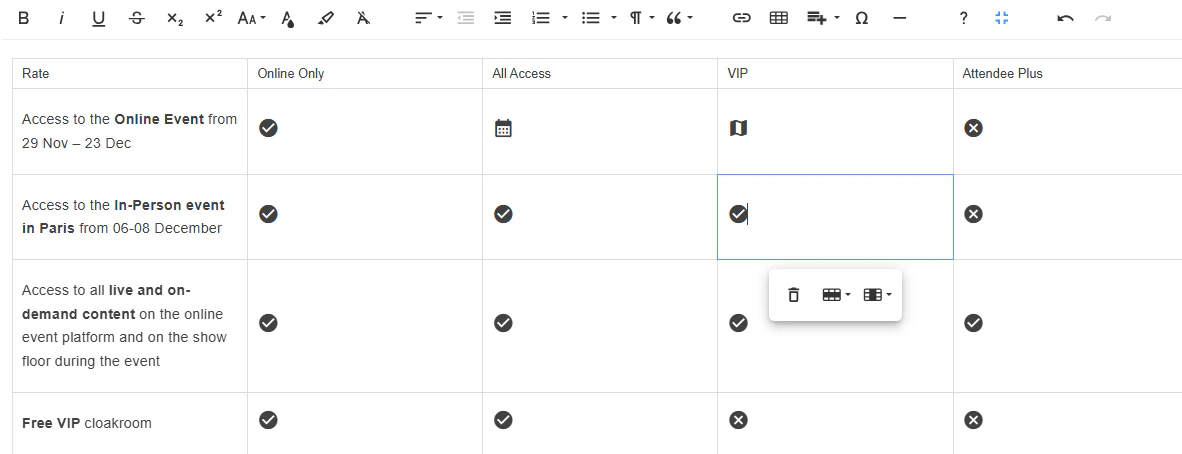
    Some options in the Table module editor have been removed to improve the authoring experience and ensure compatibility with the Table's bespoke design and responsive behaviour. For example, on smaller screens, tables are horizontally scrollable, with the first column fixed in place. This behaviour is not compatible with merged cells, so the relevant options have been removed.

    Additionally, an issue preventing certain icons from displaying correctly on published pages has been fixed.


  2. Modals - Edit Window Fix
    Fixed an issue where the modal edit window Preview Pane displayed all configured modals on a site - when multiple modals were present. The edit window now behaves as expected.

  3. Column Text - Variant 4
    Fixed an issue with block text alignment in Column Text, Variant 4.

 15 October 2026 
New Feature
  1. CTA Buttons - Icon Selection

    You can now add Material icons to CTA buttons across all existing modules. On the module's Button configuration, select an icon and choose whether it appears to the left or right of the button text.
    If an icon is configured in the Theme, selecting an icon in the button settings will override the Theme icon.

    See the screenshot below for guidance on how to configure button icons.


 09 October 2026 
Improvement
  1. Events - Simplified Site Builder Page

    The Events > Site Builder page has been reorganised to make it easier to find and manage pages.

    - Page Groups and Landing Pages are now combined into a single table.
    - The Home page is pinned to the top, followed by collapsible Page Groups and then Landing Pages without groups.
    - The Base Pages table has been moved below the combined table.

    This provides a clearer structure and makes it easier to navigate the site's pages.


 08 October 2026 
New Feature
  1. New HotelMap Module

    A new HotelMap module is now available, making it easy to display hotel information on event landing pages.

    The module displays an interactive HotelMap and its associated hotel listings based on the configured HotelMap Code.

    Authors can:
    - Enter the HotelMap Code to display the relevant hotel map and listings.
    - Place the HotelMap alongside other modules on a landing page.
    - Optionally provide a Source API URL to pass additional query parameters to the HotelMap API and customise the information displayed.

    Source API URL format:
    https://hotelmap.com/api/html/v2/listing?m=[Hotel Map Code]&[Additional Query Parameters]

    The Source API URL is optional. When provided, the additional query parameters are appended to the HotelMap request alongside the Hotel Map Code.

    For a demo, click here.


Improvements & Fixes
  1. Sites - Improved Site Management in Site Builder

    The Sites section in Site Builder has been improved and developed to replace the Events section of the CMS, providing a more centralised way to find, filter and manage Informa sites.

    Updates include:
    - SB1 Events are now included in the Sites list.
    - New Site Builder Version and Series Type columns have been added.
    - The Domain column now displays the actual domain, making sites easier to identify.
    - Sorting is now available across all columns.
    - New and improved filters make it easier to find sites by Domain, Site Builder Version, Site Type, Sector, Sub Sector and Brand.
    - One Informa taxonomy - Sector, Sub Sector and Series Type - is now displayed in the table.
    - The table has been improved for smaller screen sizes, with horizontal scrolling where needed.
    - Other minor improvements and fixes.

    These improvements make the Sites page easier to navigate and provide a clearer view of key information across both SB1 and SB2 sites.


  2. File Upload Security Improvements

    File uploads now include additional security validation to ensure only approved and supported file types can be uploaded to Site Builder.

    The upload process checks each file against the approved list, even when “All Files” is selected in the Windows file picker. This provides an additional layer of protection against unsupported or potentially unsafe files.


  3. OI Taxonomy Category Edit History

    You can now view the Edit History for each Sector and Sub Sector added under Content Meta Data > Categories on Core.

    This makes it easier to see what changes were made and when for each category.

  4. IIRIS Forms – State of Residence for Mexico
    On IIRIS Forms, the State of Residence field is now displayed when a user selects Mexico as their Country of Residence.

  5. Sites section - Performance Improvements

    The Sites section of Core has been optimised to load faster and respond more quickly, providing authors with a smoother and more efficient experience when managing sites.

  6. Rich Text Editor - Width Restored

    A display issue that caused the Body rich-text editor in Site Builder 2 modules to appear unusually narrow has been fixed.


 01 October 2026 
New Feature
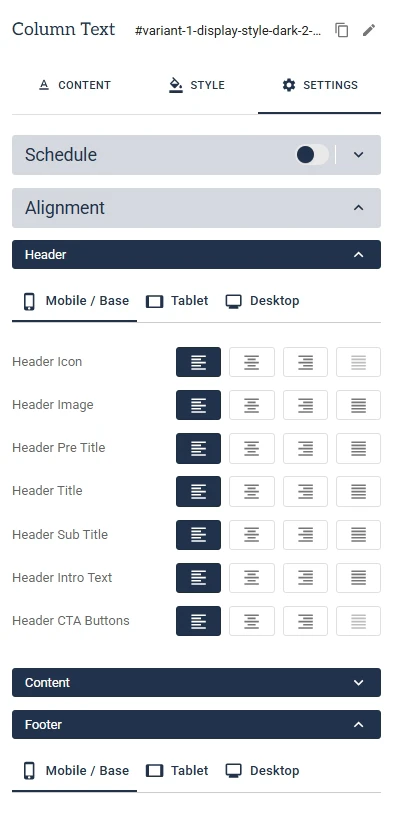
  1. Responsive Header & Footer Alignment

    Header and Footer elements within modules can now be configured with different alignments for Mobile, Tablet and Desktop screen sizes.

    This gives you greater control over the positioning of your module’s Header and Footer content, allowing you to create layouts that work better across different devices.


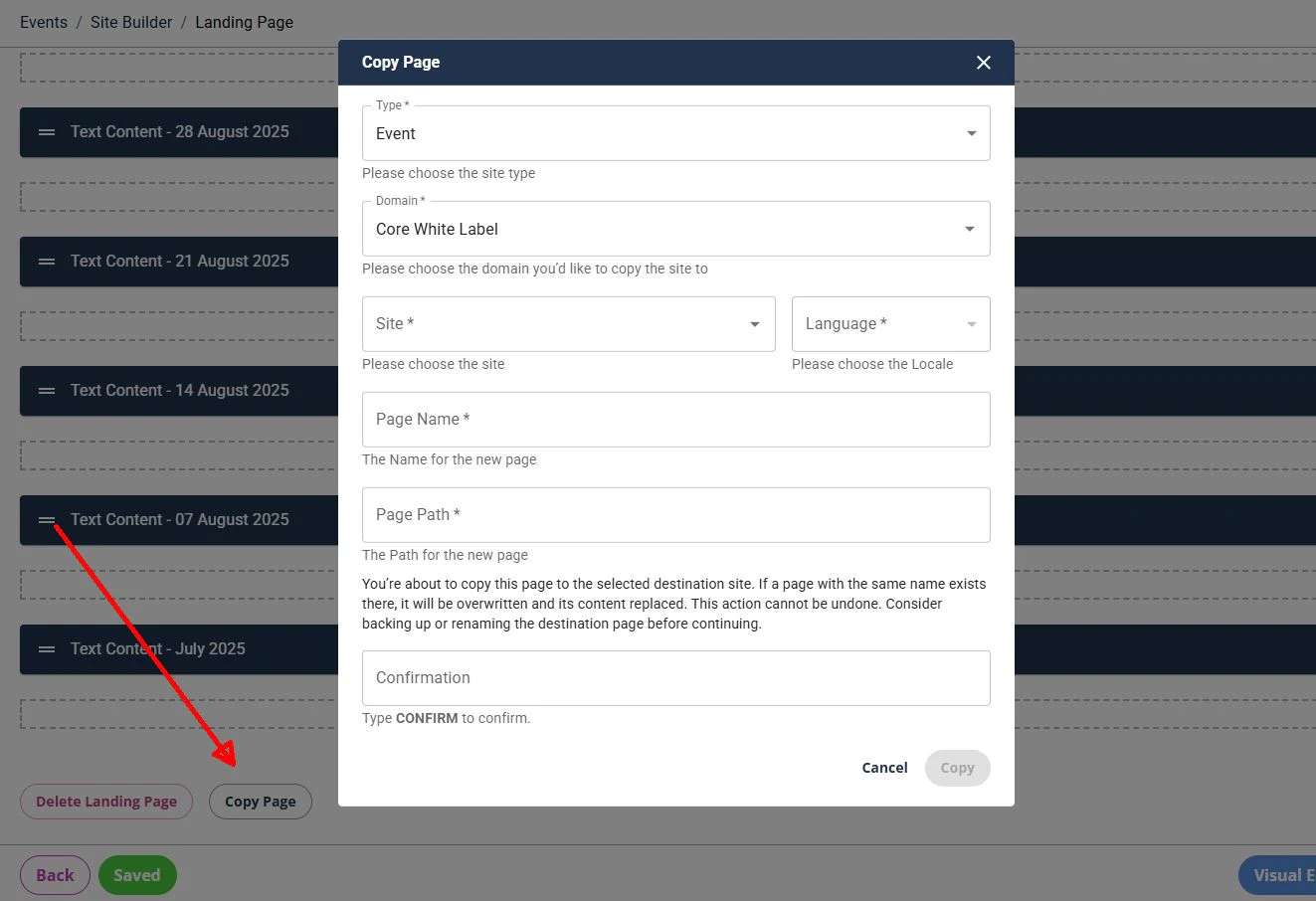
  2. Copy Page - New Direct Option

    The Copy Page functionality is now more accessible, with a new Copy Page button available directly on each page.

    In addition to the existing Copy tool, authors can now copy a page directly from the Edit page. Simply select Copy Page at the bottom of the Edit page and choose the destination where you want to copy the page.

    This provides authors with a quicker and more direct way to reuse existing pages without needing to access the Copy tool separately.


  3. Font Selection for Text Fields

    Authors can now select a font for text directly within Text fields across all modules.
    The available font options are automatically based on the font families configured in the site's Theme or Brand configuration, helping authors apply the correct brand fonts without needing custom styling.
    This gives authors greater control over the appearance of text.


Improvements & Fixes
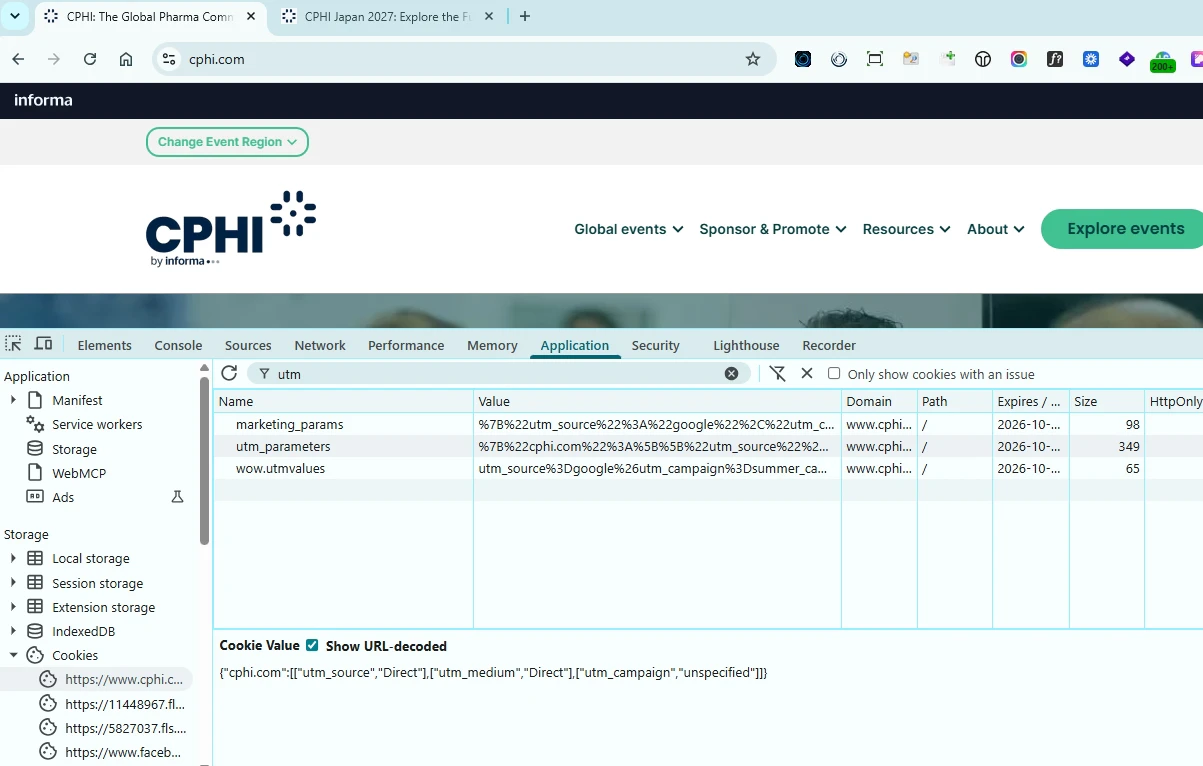
  1. UTM Tracking Cookie Improvements

    1. Issue identified
      The utm_parameters cookie was not always updating correctly when a visitor moved from a direct visit to a campaign URL containing UTM parameters.
      For example, if a visitor first accessed the site directly, the cookie was set with Direct attribution values. If the same visitor later arrived through a campaign link, the existing Direct values could persist instead of being replaced by the new campaign data. 
      As a result, the Direct attribution could be sent to the backend when the visitor submitted a form, causing the actual marketing campaign attribution to be lost.

      What has changed
      When a visitor arrives with new UTM parameters, the site's existing campaign data is now updated with the new values.

      Example:
      A visitor first arrives directly at: 
      www.cphi.com/japan
      The site sets default Direct attribution values in its UTM cookie.

      The same visitor later arrives through a paid campaign: 
      www.cphi.com/japan?utm_source=google&utm_campaign=summer_campaign

      The cookie is now updated with the new campaign values, replacing the previous Direct attribution.

    2. Consolidate UTM tracking cookie to a single domain-wide scope

      The UTM cookie storage has also been revamped to ensure campaign attribution is stored consistently across an entire domain.
      Each domain now uses a single utm_parameters cookie to store UTM data for all sites and locales under that domain. The data is associated with the relevant site using its site ID, keeping campaign attribution separate between different sites.

      Example:
      A visitor first arrives directly at:
      www.cphi.com

      This creates a new utm_parameters cookie containing the site's attribution data.


      The same visitor later arrives through a paid campaign to another site on the same domain:
      www.cphi.com/japan?utm_source=google&utm_campaign=summer_campaign

      The UTM values are stored in the same utm_parameters cookie, associated with the Japan site's ID.


      This allows multiple sites under the same domain to use a single cookie while keeping each site's campaign attribution separate.

      Benefits for users and marketing teams
      - More reliable campaign attribution: UTM data is retained as visitors navigate across an event site.
      - Reduced attribution loss: Forms and registration links use the UTM data associated with the current site.
      - Better cross-site separation: Campaign data from one site cannot be incorrectly applied to another site on the same domain.
      - More consistent reporting: Marketing teams can have greater confidence that campaign-driven registrations are attributed to the correct source.

  2. Table Module – Responsive Design Restored
    The Table module has been restored to its original responsive design, ensuring tables adapt correctly across different screen sizes and devices.
    This brings the Table module back in line with its intended responsive behaviour and provides a more consistent experience for users across desktop, tablet and mobile.

 24 September 2026 
New Feature
  1. See Edit History

    The See Edit History option is now available on SiteBuilder 2 Events and Hub sites, making it easier to keep track of changes made to your site pages.
    Each page now includes a See Edit History button in the top-left corner. Selecting it displays a list of changes made to the page over time, helping you quickly understand what has been updated and when.


 17 September 2026 
Improvements & Fixes
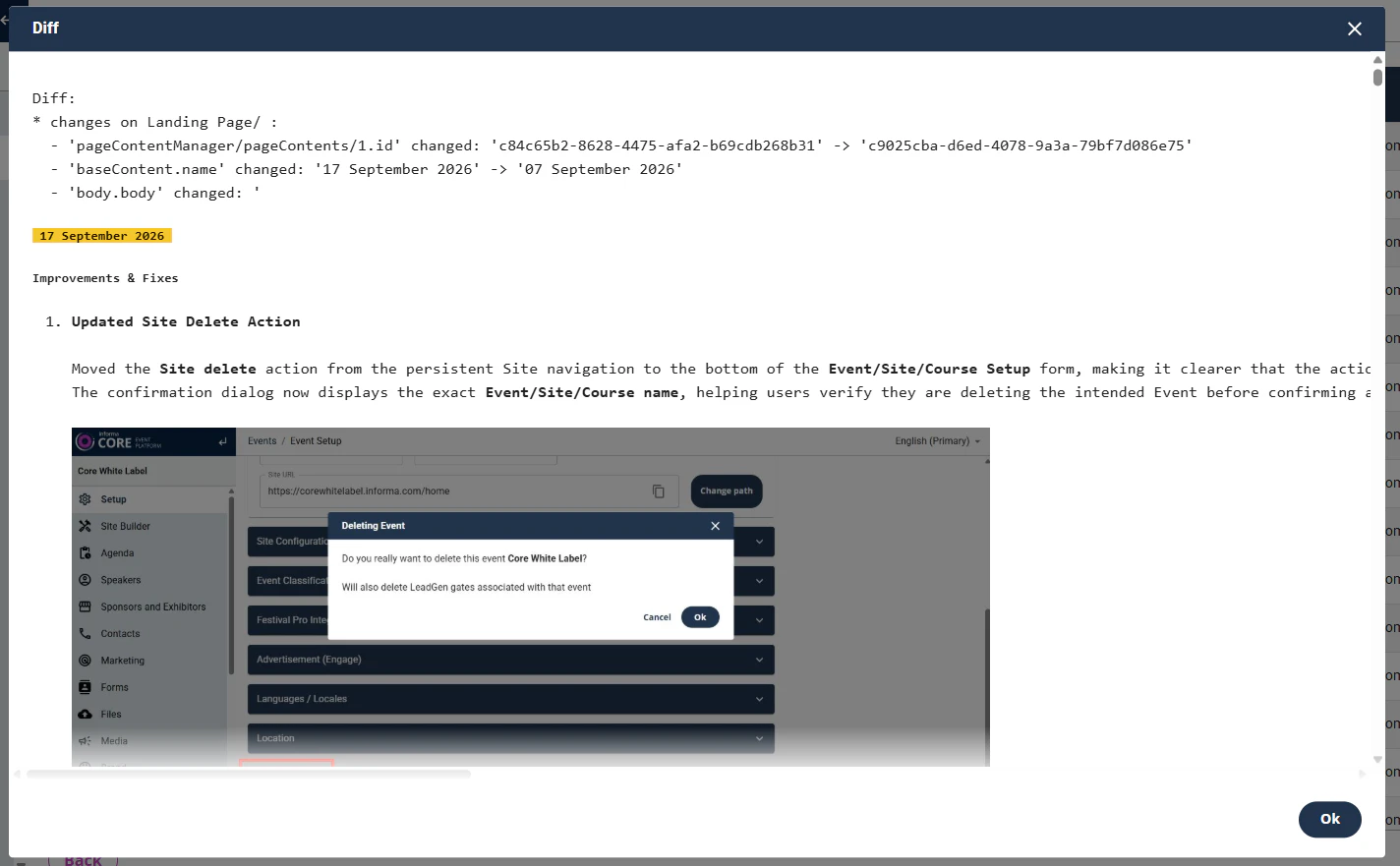
  1. Updated Site Delete Action

    Moved the Site delete action from the persistent Site navigation to the bottom of the Event/Site/Course Setup form, making it clearer that the action deletes the entire Event.
    The confirmation dialog now displays the exact Event/Site/Course name, helping users verify they are deleting the intended Event before confirming and providing an additional safeguard against accidental deletion.


    Existing permissions, deletion behaviour and success/error handling remain unchanged.

  2. Form > Admin UI Validation & Error Visibility Improvements

    Improved and fixed the Admin UI to provide a clearer and more reliable authoring experience when configuring email notifications.

    - Email fields are now validated only when Send Email is selected.
    - Error badges highlight tabs containing validation errors, making issues easier to identify before saving.
    - From Email Sender and From Email Domain are mandatory for both End User Notification and Marketer Notification when Send Email is selected.


    These changes make validation issues easier to identify and resolve while preventing incomplete email notification configurations.

  3. Enabled Theme Deletion

    Super-users can now delete themes directly from Theme Builder, making it easier to remove unused themes and keep the Theme Builder organised.
 11 September 2026 
New Feature
  1. VWO A/B Testing Support
    Added support for VWO on Site Builder 2.0, enabling teams to run A/B tests on SB2 sites and measure the impact of different page experiences.
 07 September 2026 
New Feature
  1. Exhibitor List Module > View Exhibitor Floor Plans
    Exhibitors with an available floor plan can now be accessed directly by clicking the badge on their exhibitor card.
    If no floor plan is available, the badge continues to open the Exhibitor Details page as before. This works consistently across Grid, Thumbnail and List views.
 03 September 2026 
New Feature
  1. Italian Language Support for Forms
    Extended Italian language support for Forms in Site Builder 2.0, enabling form content and functionality to be presented in Italian.
 27 August 2026 
Improvements & Fixes
  1. Advertisement Banners > Spacing
    Improved the Advertisement Banners layout by adding padding around the banners for better spacing and presentation.

  2. Navigation | Analytics
    Updated analytics events for Navigation buttons to provide clearer tracking of navigation and CTA interactions:
    - Standard navigation links now fire navbar_click.
    - Navigation items configured as Display as CTA now fire cta_click.

    This allows standard navigation clicks to be measured separately from CTA interactions in the website header.

  3. Site Builder Admin Locale Fix
    Fixed an issue where the Site Builder Admin interface could load configuration from the incorrect locale for sections such as Templated Pages, Nav Bar, Header, Pre-footer, Footer and Modals.
    This prevents incorrect locale configurations from being inadvertently saved or published, reducing the risk of incorrect localized content appearing on the live site or existing locale-specific configurations being overwritten.
 20 August 2026 
Improvements & Fixes
  1. Forms Translation Manager > Additional Languages
    Added support for Korean, Japanese, Canadian French and Russian in Forms Translation Manager.

  2. Pricing Card Module > Font Size Controls
    Added options to control the font size of text within Pricing Cards, providing greater flexibility over card content presentation.

  3. Exhibitor List Module > Design Control Enhancement
    The NEW tag and colour settings are now based on the Site-level configurations.

  4. Carousel Display Order
    Fixed a display issue affecting modules when Carousel Display Order was set to Random.

  5. Image Upload Fix
    Fixed an issue where image uploads could fail in the Text Content module when using Chrome on Windows.
 13 August 2026 
Improvements

Event Site Builder & Modules > Admin User Experience Enhancements

Improved the Site Builder and Module Admin experience with a range of usability enhancements:

  1. Site Builder Links: Added icons to key links in the top section of the Site Builder page for easier navigation.


  2. Landing Pages and Groups Table: Added Page URL, direct Preview links and Last Published date to provide more useful page information at a glance.


  3. Landing Page Groups: Groups can now be expanded within the table to view all pages belonging to the group without leaving the page.


  4. Landing Page History: Added access to page history in the top-right corner of Landing Pages.


  5. Modules > Name / Anchor Link: Updated the configuration to use a more compact layout.
  6. Modules > Titles Lite Mode: Updated the configuration to use a more compact layout.
  7. Modules > Headers: Less frequently used fields are now collapsed by default, making module configuration more streamlined.
 06 August 2026 
New Features and Improvements
  1. UTM 2.0 Logic Update

    Updated UTM tracking to allow sites to suppress the default “Direct” values previously assigned to utm_source and utm_medium when a visitor arrives at a site without UTM parameters.

    A new toggle is available under the Marketing section of each site, allowing site owners to enable this behaviour on an individual site-by-site basis. This toggle gives individual site owners control over when to adopt the new behaviour, reducing the risk of an immediate impact across all sites.


    When enabled, utm_source and utm_medium will remain blank when no UTM parameters are present, providing cleaner and more accurate campaign attribution data.

    Note: After enabling the toggle, the Marketing page must be saved and published for the change to take effect on the live site.

  2. Reset Site-Level Branding

    Added an option to reset site-level branding and custom module styling for an Event site to allow OI Brand Themes to be applied consistently across multiple Site Builder 2.0 sites.

    The reset:
    - Removes custom values from Colour Setup, Gradient Setup and Font Setup in Brand Configuration.
    - Resets custom Text Style and Colour settings across all modules on all pages to their defaults.
    - Resets all Container Settings to blank across all modules on all pages.

    Pages are automatically saved after the reset, but changes are not published automatically.


  3. Files > View on Published & Preview URLs
    Files added to a site's Files section can now be accessed through both Published and Preview URLs.

  4. Domain-Level robots.txt
    Added an option to configure robots.txt at the domain level in Tenant Manager.

Bug Fixes
  1. Secondary Language Publishing Fix
    Fixed an issue preventing Secondary Languages from being published for Events and Courses when the Setup Page for the secondary language had not yet been published.

  2. Hide Informa SSO Bar Fix
    Fixed an issue with the Hide Informa SSO Bar feature to ensure the setting works as expected.
 30 July 2026 
New Features and Improvements
  1. Theme Builder Enhancements
    Added options to duplicate themes and change the default sort order of themes.

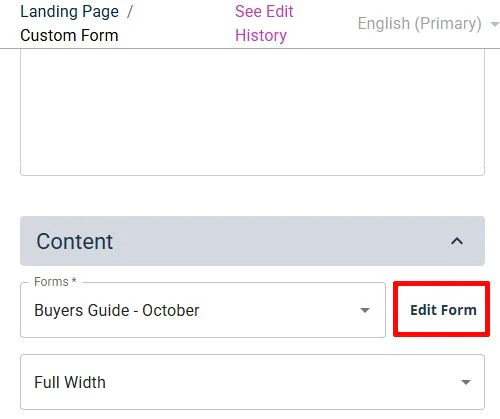
  2. Custom Form module > Direct Form Editing: 
    Added a direct Edit Form link in the Custom Form module, allowing users to open the selected form directly without navigating to the site's Forms section to find it. This reduces the number of steps needed to access and update forms, saving time for site administrators.

  3. External Content Data via API
    External Content data is exposed via the Core API.

  4. Page Group Path Validation
    Page Group paths are now prevented from adopting reserved paths used by Templates or Base Pages.

Bug Fixes
  1. Copy Module > Page Groups
    Fixed an issue where pages within Page Groups were not available in the destination dropdown when copying a module.

  2. Event Schema Markup
    Fixed an issue where Start Date and Location were missing from Event Schema markup.
 23 July 2026 
Improvements
  1. Unique Theme Names
    Theme names in Theme Builder are now required to be unique. New and updated theme names are validated against existing themes to prevent duplicates.
 16 July 2026 
Improvements
  1. Marketer Notification Email Updates
    Improved form notification emails to include:
    • City and Country fields when both are included in the form.
    • Selected Interest field options.
 09 July 2026 
Improvements & Fixes
  1. Form Tracking DataLayer Events
    Added custom dataLayer events for form submissions on SB 2.0 pages. This provides more accurate GA4 tracking by allowing the Analytics team to use custom events instead of GA4 Enhanced Measurement, which was causing duplicate form_submission events and inflated submission figures.

  2. Landing Page 404 Fix
    Fixed an issue where Live and Published Landing Pages could sometimes incorrectly appear as 404 Not Found.

  3. Sticky Header Fix
    Fixed an issue where the Informa SSO Bar could appear behind the site's header when the Sticky Header option was enabled.
 07 July 2026 
New Features 
  1. One Informa SSO Utility Bar

    The One Informa SSO Utility Bar is now available across SiteBuilder 2 event sites, giving visitors a consistent and familiar way to access their Informa account.


    Visitors can now:
    - Log in or create an account directly from the utility bar.
    - See a personalised greeting when logged in.
    - Quickly access their Informa account and profile.
    - Log out easily when they’re finished.

    This creates a simpler, more consistent account experience across Informa event sites. 

    Find out more: Read the full One Informa SSO announcement

 02 July 2026 
New Features and Improvements
  1. Italian Language Support
    Added support for Italian-language sites in Site Builder 2.0.

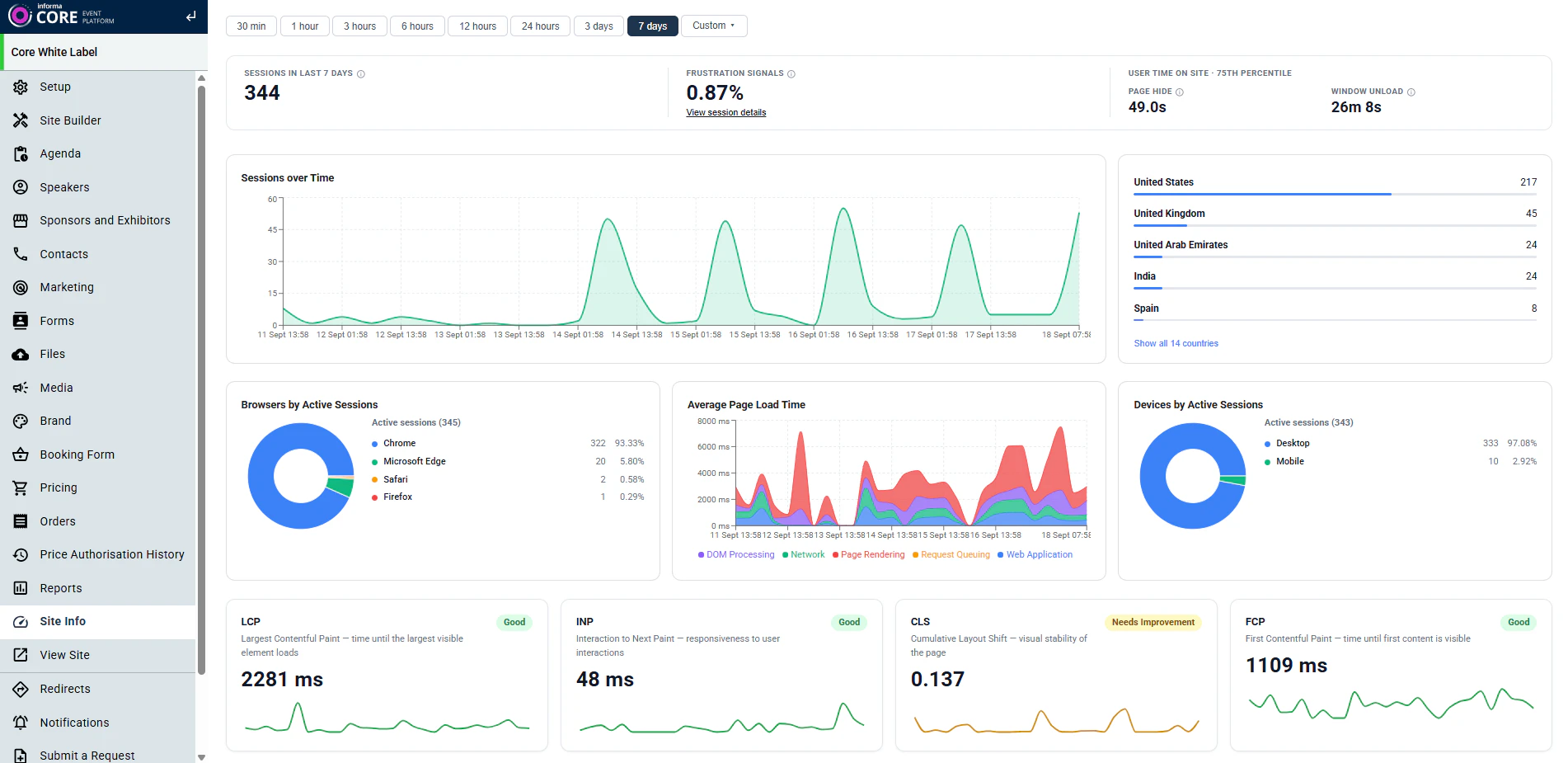
  2. Event Site Analytics Dashboard
    Added a new Site Info menu to Event sites in Core Admin for Site Builder 1.0 and 2.0.
    The dashboard provides a single view of real-time and historical web performance analytics, including session activity, Core Web Vitals, page load times and URL-level performance.
    Analytics are shown at the appropriate level: Parent Event sites include data across the domain and secondary sites, while Child Event sites show data for that site only.

    For example:
    Parent Event site: cphi.com - analytics cover the whole domain, including secondary sites.
    Child Event site: cphi.com/americas - analytics cover pages within the Americas site only.


Bug Fixes
  1. Header Logo Display
    Fixed logo distortion affecting the Header on certain older iPhone models.

  2. Image Gallery Display
    Fixed image distortion and layout issues across different screen sizes, ensuring images maintain their aspect ratio and spacing.
 25 June 2026 
New Features and Improvements
  1. Increased Navigation Text Limit
    The character limit for navigation menu items and group names has been increased from 20 to 30 characters, allowing longer translations in languages such as French, where the same wording can often require more characters than English.

  2. Form Reset Button Text Customisation
    Added an option to customise the Form's Reset button text in all supported languages.

  3. New Exhibitor Badge
    NEW badge is now also displayed on the new exhibitors in the List View of the Exhibitor List.


Bug Fixes
  1. Pricing Cards Text Wrapping Issue 
    Fixed an issue causing incorrect text wrapping in the Pricing Cards module.

  2. Unpublished Changes Going Live
    Fixed an issue where certain module changes were being applied to live sites without being published.

  3. Carousel Pagination
    Fixed an issue where carousel pagination dots were not displaying correctly.
 18 June 2026 
New Features and Improvements
  1. Data Available via API
    The following data is now exposed through the API:
    1. Course data
    2. News data
    3. Content metadata

  2. Site Status Warning
    Site admins now see a warning notification when setting a site to Not Live in the Admin Panel, helping prevent admins from inadvertently deleting a site.

 28 May 2026 
New Features and Improvements
  1. Event Schema Update:
    For Site Builder 2.0 Events, Delivery Type is now automatically populated from the Edition Format.

  2. Button Links Fixed:
    Fixed an issue where buttons in the Blocks of the Column Text module generated incorrect URLs when configured to open in the same tab.
 21 May 2026 
New Features and Improvements
  1. Footer Social Media Links - Open in New Tab
    Updated the Footer social media link behaviour so that all social links now consistently open in a new browser tab. This includes both predefined social links and any social links configured using absolute URLs.

  2. Enhanced User Interaction Tracking for Analytics (SB2.0)
    New analytics tracking capabilities have been implemented across Site Builder 2.0 to provide deeper insights into user engagement, navigation behaviour, and content discovery patterns.
    • CTA click tracking is now supported across modules, template pages, navigation, and other CTA surfaces through the new cta_click event.
    • Navigation tracking has been added across all navigation bar variants, capturing interactions with main and secondary navigation links through the new navbar_click event.
    • Filter interaction tracking has been introduced for Speakers and Sponsors Template Pages, capturing filter selections, deselections, and search interactions through the new filter_change event.

These enhancements improve marketing analytics, campaign measurement, and user journey reporting while ensuring no impact on existing site functionality or performance.

 30 April 2026 
New Features and Improvements
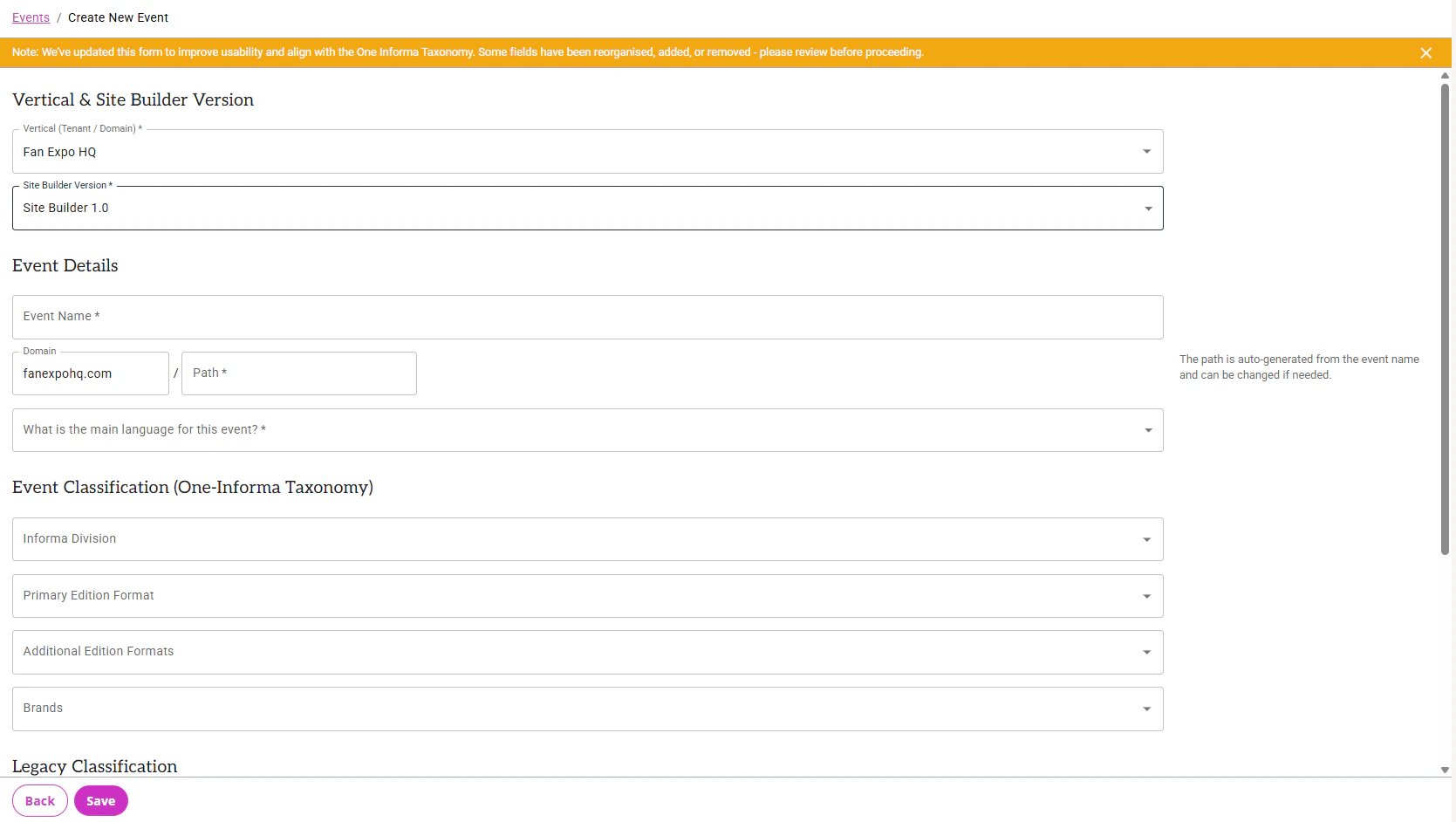
  1. New “Event Create” Form
    The Event Create form has been redesigned to improve usability and align with One Informa Taxonomy requirements. Key updates include:
    • Removal of redundant and unnecessary fields for Site Builder 2 Events.
    • Reorganised field order and grouping for improved clarity and navigation.
    • Streamlined workflow for creating both Site Builder 1 and Site Builder 2 sites by allowing authors to select the Site Builder version upfront after selecting the Vertical (Tenant/Domain).
    • Introduction of new Event Classification fields to support One Informa Taxonomy categorisation.


  2. New “Event Setup” Form for SB2.0 Sites
    The Event Setup form for Site Builder 2.0 sites has also been updated to improve usability and support One Informa Taxonomy requirements. Enhancements include:
    • Removal of redundant and unnecessary fields.
    • Improved field ordering and logical grouping for a clearer setup experience.
    • Introduction of the new Event Classification field for taxonomy alignment.

 23 April 2026 
New Features and Improvements
  1. Sub Sector Metadata Management Enhancements (Super Users Only)
    New fields added to the Sub Sector configuration to support additional data requirements for the new corporate site’s Explore section.
 16 April 2026 
New Features and Improvements
  1. SEO - Schema Markup Support for SB2 Event Homepages
    Site Builder 2.0 event homepages now support Organisation and Event schema markup using JSON-LD structured data. The implementation includes Event and Organiser schema definitions aligned with Schema.org standards and Google Rich Results requirements, helping improve SEO visibility and search engine understanding of event websites. 
    Event attendance mode, event location, organiser details, and other key metadata are now automatically rendered based on Event Setup configuration.
 09 April 2026 
New Features and Improvements
  1. Statistics Module - Improved Number Animation
    The Statistics module animation behaviour has been improved. Previously, animated numbers could complete before the module entered the user’s viewport if positioned below the page fold.
    The animation will now start only when the module scrolls into view and will re-run if the module re-enters the viewport after scrolling away.

  2. Statistics Module - New Variant 3
    A new Variant 3 has been introduced for the Statistics module, featuring an updated design and a new Title field.


    In Variant 3, the Title displays next to the number and suffix.
    In Variants 1 and 2, the Title displays above the Description field.

    For a demo, click here.

  3. Sector Metadata Management Enhancements (Super Users Only)
    Improvements have been made to Sector metadata management to support requirements for the new corporate site’s Explore section. 
    Enhancements include:
    • New fields added to the Sector configuration to support additional data requirements.
    • Admin UI improvements for easier sorting and searching of Sector data.
    • Ability to view and manage associated Sub-Sectors directly within the Edit Sector form.

  4. Form Translation Manager - LOV Sync Improvements (Super Users Only)
    To ensure the latest LOV updates are reflected in Core SB2 forms more efficiently, an automated sync mechanism has been introduced.
    • Core’s LOV database now synchronises with the latest LOV updates every hour.
    • A new manual sync button has also been added, allowing Super Users to trigger an immediate sync when required.
 02 April 2026 
New Feature
  1. List Tags Module – Style Enhancements
    New styling options have been added to the List Tags module, allowing authors to customise the tag colour and tag text font size for greater design flexibility and visual consistency.

 26 March 2026 
New Features
  1. Sponsors & Speakers Template Pages 

    Now available to all users on Site Builder 2.0, these pre-defined layout template pages (with additional variants planned for future releases) enable authors to quickly set up Sponsors and Speakers listings with minimal effort.

    Compared to module-based implementations, these template pages provide built-in search and filtering capabilities on listing pages (i.e. /sponsors, /speakers) and automatically generate individual profile pages (i.e. /sponsors/[sponsor-name], /speakers/[speaker-name]). This delivers a more structured, scalable, and user-friendly experience.

    The template pages dynamically pull data from the Speakers and Sponsors sections in Core.

    For the Sponsors Template Page demo, click here.
    For the Speakers Template Page demo, click here.


  2. Translation Manager (Super users / Restricted access)
    A new Translation Manager tool has been introduced, allowing admins to manage LOV (List of Values) translations for IIRIS Forms on Core SB2.0 directly within Core.
    Previously, this required development updates and deployments. This enhancement significantly reduces turnaround time for adding or updating LOV translations to the forms.
    Super Users with access to the tool can find this under Core Settings > Localisations and Languages > Form Translation Manager.

  3. Content Meta Data - Informa Divisions
    A new list has been added to manage Informa Divisions, aligned with One Informa taxonomy requirements.

  4. Content Meta Data - Series Type & Sub-Type
    New lists have been introduced for Product Series Type and Series Sub-Type, aligned with One Informa taxonomy requirements.

Improvements and Bug Fixes
  1. Preview Pane Fix
    Resolved an issue where the Preview Pane was not working for some users while editing modules or using the Visual Editor. The Preview Pane now functions as expected.
  2. Content Meta Data > Categories - Delete Restriction
    Categories that are currently in use can no longer be deleted, preventing accidental data inconsistencies.
  3. Sub-Sector Meta Data
    Fixed an issue when creating a new Sub-Sector where not all Sectors were visible in the Sectors dropdown on the Create Sub-Sector form.
  4. Content Meta Data - Filtering
    Resolved an issue with filtering in tables under Core Settings > Content Meta Data.
  5. Navigation & Language Selector UI
    Fixed an issue where menu navigation items and the language selector dropdown appeared misaligned when the page was zoomed in or out.
 5, 12, 19 March 2026 
New Modules and Features
  1. ‘Brand’ and ‘Edition Format’ Meta Content (One Informa Taxonomy)
    New metadata fields for Brand and Edition Format have been added under Core Settings > Content Meta Data, in line with One Informa Taxonomy requirements. 
    Access to these settings is restricted to authorised users only.

  2. Copy Event to Root Tenant (Super Users Only)
    A new option allows Super Users to copy a website directly to the root of a tenant, provided the destination tenant is configured as a root tenant.
    Note: This action will overwrite any existing site at the root level. Please use with caution to avoid unintended content loss.


  3. Files - Recycle Bin
    The Files section now includes a Recycle Bin. Deleted files are moved to the Recycle Bin and can be restored by authors if needed.
    Note: Files deleted prior to this feature release are also available in the Recycle Bin and can be restored.

Improvements and Bug Fixes
  1. Copy Event - Enhancements
    • When pages are copied as part of the Copy Event process, the “Make this page live” toggle state is now preserved (i.e., it remains on or off as per the source site).
    • All copied sites will have the “Make this site live” toggle turned off by default, regardless of the source site’s status. This ensures copied sites do not go live unintentionally and must be explicitly published.

  2. Arabic Layout Fixes
    Addressed various design and layout issues across Arabic (right-to-left) websites.
 26 February 2026 
New Features
  1. Site Builder 2 sites on SB1 Tenants
    Site Builder 2 sites can now be created on tenants originally configured for Site Builder 1.
    This enables both SB1 and SB2 sites to coexist under the same domain, providing greater flexibility during migration and rollout.

  2. HTML Block - Search by Name (Super Users Only)
    The Admin UI now includes a search option to find HTML Blocks by name, making it easier for Super Users to locate and manage existing blocks.


  3. Newsletter Form
    The Newsletter Form has been updated to include a “Session” field to support required data collection needs.

Improvements and Bug Fixes
  1. Table & Text Content Modules
    Removed redundant in-editor alignment options for cleaner authoring.
    Note: The primary text alignment controls in the editor toolbar remain unchanged.

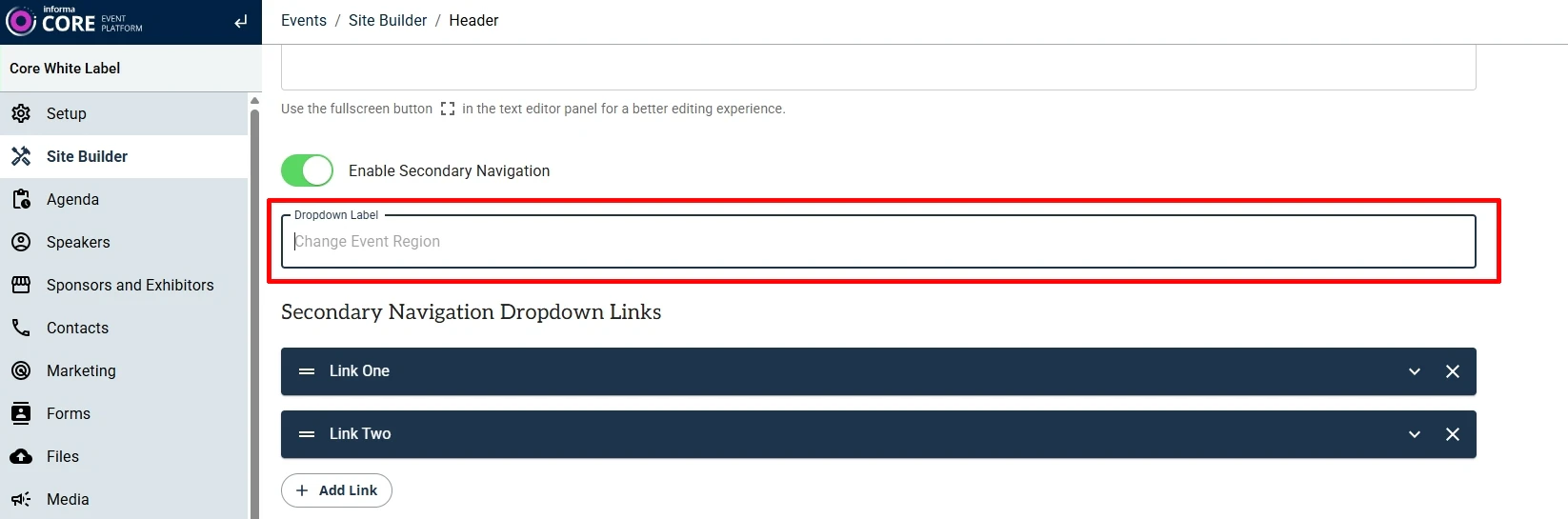
  2. Header - Variant 3
    In the Secondary Navigation dropdown links, the label “Change Event Region” was previously hard-coded.
    This has been updated to allow a customisable dropdown title, with “Change Event Region” set as the default value.

  3. Exhibitor List
    Resolved an issue where the Exhibitor List did not display for certain Event Edition Codes.

  4. Arabic Layout Fixes
    Minor alignment and layout issues have been corrected for Arabic (right-to-left) layouts in the Hero module.


 19 February 2026 
New Features
  1. New Meta Content for One Informa Taxonomy
    New metadata fields have been introduced for Sector (Industry) and Sub-Sectors (Topic) under Core Settings > Content Meta Data > Categories, in line with One Informa Taxonomy requirements. Access to these settings is restricted to authorised users only.

Improvements and Bug Fixes
  1. Site Builder Version Selector on SB2.0
    The Site Builder version dropdown is now permission-controlled to prevent users from accidentally switching versions. 
    This update also resolves a caching issue that previously caused the site version not to update correctly after being changed.

  2. Module Size Limitation
    Module size is now restricted to 1MB to prevent issues related to excessive page size and performance.

  3. Arabic Layout Fixes
    Minor alignment and layout issues have been resolved for Arabic (right-to-left) layouts in the Testimonial and Tiles with Navigation modules.
 12 February 2026 
New Modules and Features
  1. Visual Editor – Live Page Preview
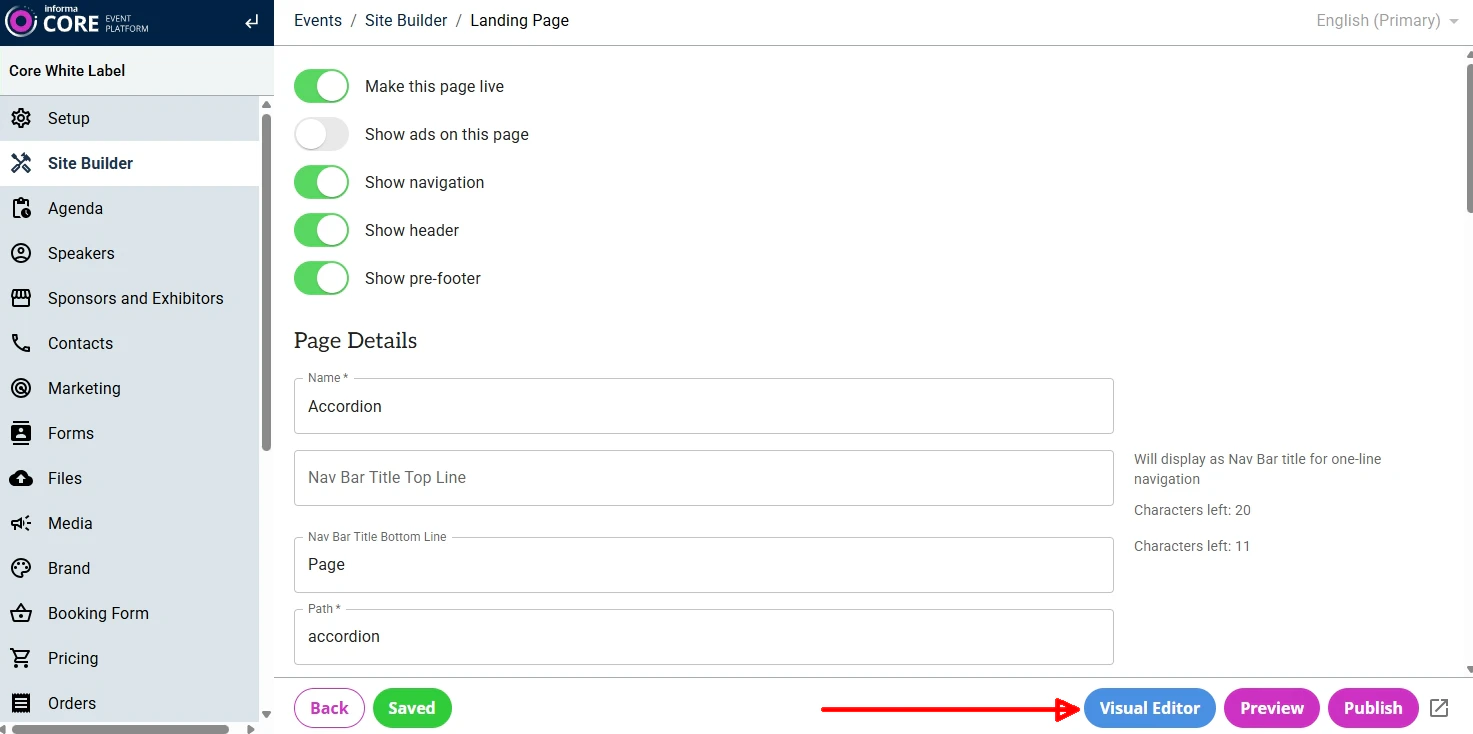
    A Visual Editor enhancement has been introduced to display the full page in the Preview Pane while authoring, providing a more accurate real-time editing experience.
    Click on the “Visual Editor” button to launch the full-page edit mode.


  2. Open Graph Image Support (SB2.0)
    Open Graph image support is now available for Site Builder 2.0 sites.
    The image uploaded under Marketing > Social Sharing Image will now be rendered as the Open Graph image across all pages of the site, improving social media sharing previews.

Improvements and Bug Fixes
  1. Footer Display Fix
    Previously, an empty Footer displayed blank space on the page. This has been corrected - the Footer will no longer render if it is not populated.
  2. Mega Menu - Promotion Section
    Addressed an issue where the Promotion section left an empty (black) space when not enabled. The section now collapses properly when disabled.
  3. Copy Event
    Various fixes and stability improvements applied to the Copy Event functionality.
 05 February 2026 
New Feature
  1. UTM Parameters for iFramed URLs
    The iFrame module has been updated to support appending UTM parameters to iFramed URLs.
    Note: The domain of the iFramed URL must be configured in the Marketing > Third Party URLs section of the site.

  2. Core Settings Admin UI Update (Super Admins Only)
    Minor updates have been made to the Core Settings Admin UI to support upcoming sections related to OI taxonomy work.

Improvements and Fixes
  1. Forms - Display Style Fix
    Fixed an issue where autofilled form-field values in Chrome were not visible when using the Standard (white) Display Style. Autofilled values are now displayed correctly.

 29 January 2026 
New Modules and Features
  1. List Tags Module
    A new lightweight listing module for displaying feature tags, helping readers quickly scan content and understand relevance at a glance.
    For demo, click here.
    Note: Additional enhancement to control the colour of the tags is pending release.

  2. Custom Themes for Non-Primary Languages
    Support has been added for applying custom themes per site language, allowing different fonts and font sizes for non-primary locales when they differ from the primary language site.
    Note: Fonts defined in the Brand section of an Event will not override fonts on non-primary locales if a different theme is applied to those locales.

  3. Sub-Folder Support in Site URLs
    Sites can now be created using sub-folder URL structures by enabling the Path Prefix option.
    Example: www.myevent.com/section/sub-section/eventname/

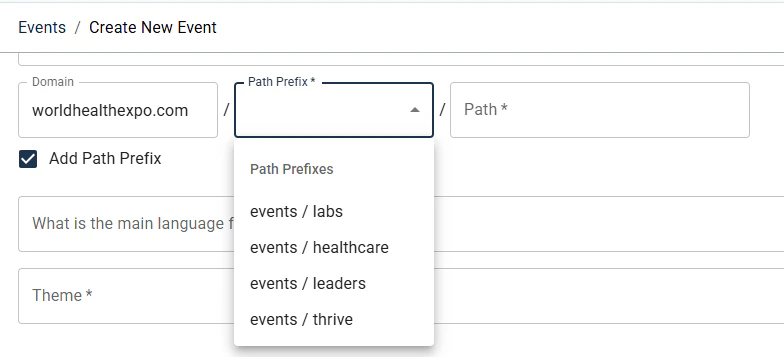
    To add a Path Prefix during Event creation, select the “Add Path Prefix” checkbox and choose a predefined Path Prefix from the dropdown. Path Prefixes are configured in the tenant’s configuration file, and additional prefixes can be requested via ServiceNow.


Improvements and Bug Fixes
  1. Table Module
    The Table Content editor now supports text alignment within table cells, providing greater control over table presentation.


  2. Copy Page
    Base pages can now be copied from one locale to another within the same site.

  3. General Fixes
    Addressed various design-related issues in the Header and Table modules.
 22 January 2026 
New Feature
  1. Copy Site Support (Super Users Only)
    Site Builder 2.0 now supports the Copy Site feature within the Copy tool (available to Super Users only). For marketers, this means a full website can be duplicated to quickly set up a new site with a significantly faster turnaround time.

  2. Image Gallery - Variant 4
    A new Variant 4 has been added to the Image Gallery module, displaying the image title overlaid on top of each image.
    For a demo, click here.

  3. Video Gallery - Variant 3
    A new Variant 3 has been introduced for the Video Gallery module, displaying both the video title and pre-title overlaid on the video.
    For a demo, click here.

  4. Module Header Width Control
    A new Header Width option has been added to the Style tab of all modules, allowing authors to control the display width of module headers independently from the module content.

  5. Header Variant 3 – Inline Navigation Enhancements
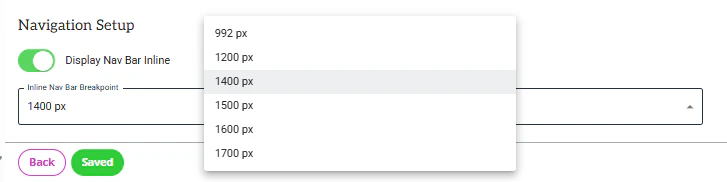
    On Header Variant 3, when the “Display Nav Bar Inline” option (under Navigation Setup) is enabled, the navigation is displayed in the same row as the logo.
    Additional breakpoint options have now been added to the Inline Nav Bar Breakpoint setting, and existing values have been renamed for clarity.

    How it works:
    When 'Display Nav Bar Inline' is enabled, navigation may need to wrap below the logo on smaller desktop screen sizes, depending on the number and length of menu items. This behaviour can be controlled using the Inline Nav Bar Breakpoint setting. This provides greater control over navigation layout across different desktop screen sizes.

    • Selecting 992px → Navigation wraps when the screen width is 992px or below
    • Selecting 1200px → Navigation wraps when the screen width is 1200px or below
    • Selecting 1400px → Navigation wraps when the screen width is 1400px or below
    • Selecting 1500px → Navigation wraps when the screen width is 1500px or below
    • Selecting 1600px → Navigation wraps when the screen width is 1600px or below
    • Selecting 1700px → Navigation wraps when the screen width is 1700px or below
 15 January 2026 
New Features
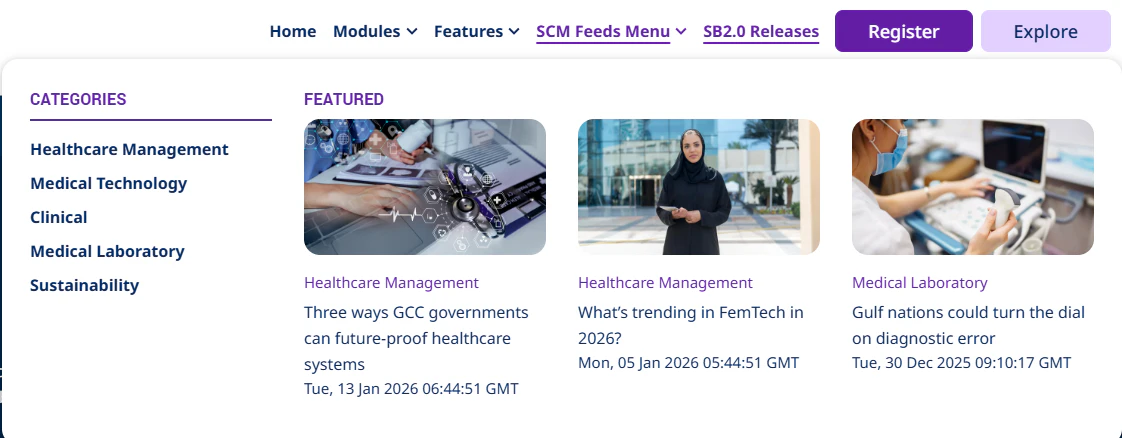
  1. Navigation Mega Menu - SCM Feed Integration
    The Navigation Mega Menu now supports displaying article categories and sub-categories along with featured article thumbnails from the SCM feed.
    For a demo, hover over the “SCM Feeds Menu” on this website.

  2. Copy Tool - Permission Update
    All users with access to log in to Core now have access to the Copy tool by default. Users will continue to see and copy only the sites they have permission to access.

  3. UTM Cookie Update
    The utm_parameters cookie max-age has been updated to 30 days for all Site Builder 2.0 (SB2.0) sites on Core.

  4. New Base Theme - MAR
    A new base theme, MAR, has been developed to reflect the specific styling requirements for ESA market websites.

Improvements and Bug Fixes
  1. RSS Feeds Module: The module has been renamed to “RSS Feeds” (previously “SCM Featured Insights”). Issues related to image aspect ratio handling from the feed have also been corrected.
  2. List Module - Variant 2: Fixed icon alignment issues.
  3. Header - Variant 3: Reduced paragraph spacing for the Logo Side Text option.

  4. Testimonials Module: Corrected the testimonial text markup to render using a <p> HTML tag instead of <h2>.
 08 January 2026 
New Feature
  1. Column Text - Multiple CTAs per Block
    The Column Text module now supports multiple CTAs / buttons within a single block, providing greater flexibility for linking to multiple actions from the same content area.

Improvements and Bug Fixes
  1. Header - Variant 3 
    Minor UI fixes and visual improvements applied.
  2. List Module
    Added missing List Item Block style options under Style > Content, giving authors more control over list presentation.
  3. Hero Module
    Fixed an issue where extra spacing appeared above the module footer when Margin Bottom was defined. The spacing is now applied correctly below the footer.
  4. Image Gallery - Variant 3
    Resolved an intermittent issue that caused a 500 error to be displayed in certain scenarios.
 18 December 2025 
New Modules and Features
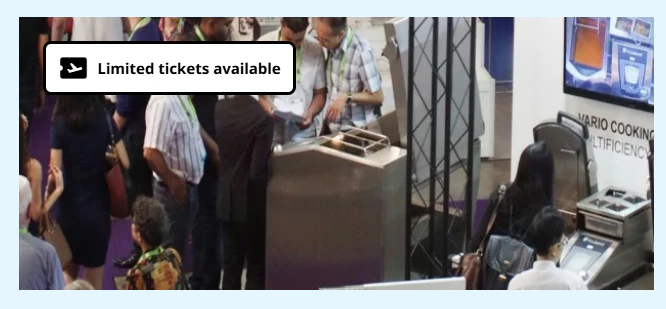
  1. Image Tag with Icon (New Option)
    A new option is now available to display a tag with an icon on images within supported modules. This helps highlight key information or statuses directly on imagery.
    For a demo, click here.

  2. SPEX Category - Variant 3
    This variant allows multiple categories to be displayed side by side, showing logos from all selected categories in a single row. The organisation name appears above each image, while category names are intentionally hidden for a cleaner layout.
    For a demo, click here.

Improvements
  1. Accordion & Tiles with Navigation - Button Alignment
    A new configuration option allows authors to control button alignment within blocks of the Accordion and Tiles with Navigation modules.

  2. General Fixes and Improvements:
    1. Image display issues on mobile layouts.
    2. Theme font colour not applying correctly in some modules.
    3. Pages returning a 404 error after being moved to a group when viewing the published version.
    4. Design inconsistencies in Accordion Variant 2.
    5. Background video mute icon colour corrected for Dark display style.
 11 December 2025 
New Modules and Features
  1. Clickable Phone Numbers in CTAs and Hyperlinks
    • The "tel:[number]" functionality can now be configured in all modules, similar to the "mailto" feature.
    • This allows users to tap or click a phone number on a webpage to initiate a call directly from supported devices.
    • View Demo

  2. Column Text module - Pre-Title Fields
    • Two new fields - Pre Title 1 and Pre Title 2 - have been added to the Column Text module. These optional fields appear above the block title and can be used to add supporting or contextual information.
    • View Demo

  3. Hero Module: New Header Variant
    • A new Style > Header Variant 4 option is now available in the Hero module, allowing authors to apply specific header text spacing for this design. 
    • This allows for specific header text spacing tailored to this design.
    • Examples:
  4. Text Content Module: Horizontal Line Option
    • A new option has been added to the editor of the Text Content module, allowing users to insert a horizontal line between text elements.
    • View Demo

  5. Page-Level Ads Toggle (Super Users Only)

    A new “Show ads on this page” toggle has been added to the Admin UI of each page. 
    Available to Super Users only, this setting allows administrators to enable or disable advertisement banners on a per-page basis.
    Note: When the toggle is turned OFF, ad units and scripts are not loaded or rendered on the page, and ad impressions are not counted.
    Additional note: If you would like ads to be disabled on any page of your site, please raise a ServiceNow ticket for assistance.

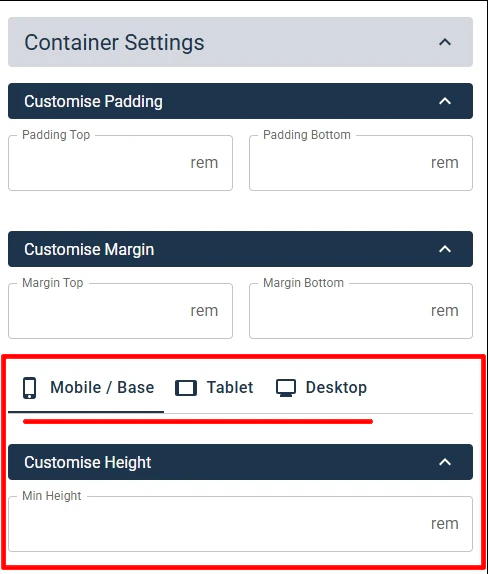
  6. Module Height Customisation by Viewport
    • Designers now have additional options to customise module height independently for Desktop, Tablet, and Mobile viewports.
    • These settings are available under module's Settings > Container Settings > Customise Height.
    • By default, Min Height is empty for all viewports.
    • If Min Height is set for Mobile only, the same value will apply to Desktop and Tablet unless overridden.
    • Min Height defines the minimum container height; the module may expand further if content exceeds the defined value.
    • Demos:
Improvements and Bug Fixes
  1. Hero Key Visual: Minor design fixes applied across all resolutions (desktop, tablet, and mobile).
  2. UTM Support for Hyperlinks: UTM parameters can now be appended to third-party URLs added as hyperlinks within module editors. Previously, this was supported only for Buttons/CTAs.
  3. Miscellaneous Design and Functionality Fixes: 
    • Various design and functionality issues resolved in the Hero, Modal, and Accordion modules (Variant 2).
    • Fixed style issues for Buttons in the Text Variant.
  4. Copy Module's URL: The Copy URL feature across all modules now correctly copies the URL with the appropriate anchor ID.
  5. Testimonials Module (Variant 1): Fixed image overflow issues on mobile and tablet views.
  6. Navigation Bar - Custom Links: The Open in new tab toggle now opens links in a new window correctly.
 04 December 2025 
New Modules and Features
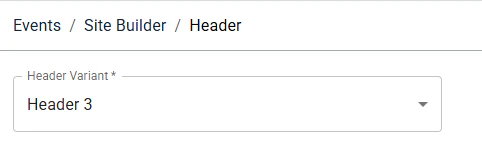
  1. Header Variant 3: 

    A new Header Variant 3 is now available, offering more layout and navigation flexibility. 

    This website now uses Header Variant 3.
    Note: Additional improvements are in progress

    Key Features:
    1. Navigation can be positioned to the right of the logo, with controls for when it wraps below, while keeping the right-side buttons fixed on the right.
    2. Right-side buttons can be styled independently.
    3. Optional text and icons can now be placed beside the logo.
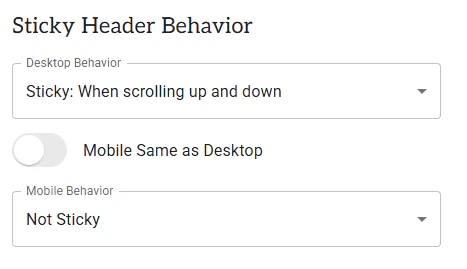
    4. New sticky header options for Desktop, Tablet, and Mobile, including scroll-up and scroll-up/down behaviours, with separate mobile controls.
    5. Desktop dropdown and Mega Menu follow Variant 2 behaviour; the mobile menu remains unchanged.

  2. Header in Modules: New Icon Placement Option
    A new icon field is now available, allowing you to place an icon above the Pre Title in module headers. 
    For a demo, click here.  

  3. List Module (New)
    A new List module, offering four design variants to help you create and present listed content more effectively. 
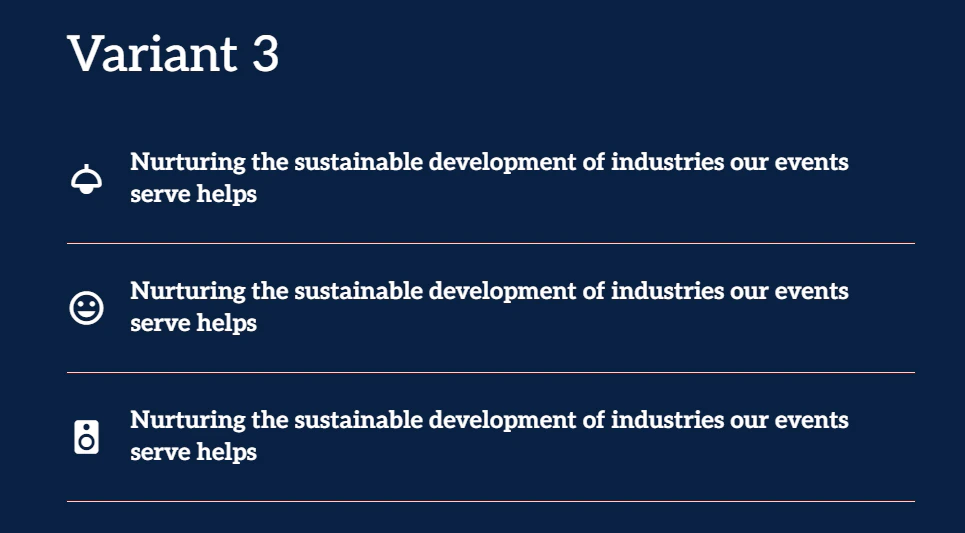
    Explore the demo variants below:
  4. Column Text: New Variant 4
    A new Variant 4 for Column Text, allows displaying bold card-style layouts in multiple sizes.
    For a demo, click here.

  5. Background Video Enhancements
    - Support added for separate background videos for desktop and mobile.
    - New sound control button, muted by default and user-controlled.
    For a demo, click here.


Improvements
  1. Image gallery, Variant 3: added support for reversing the image order for the Arabic locale.
  2. On Forms, on the Phone field, the 'Phone Number Country Code' has been moved to display above the 'Phone Number Area Code'.
 27 November 2025 
New Modules and Features
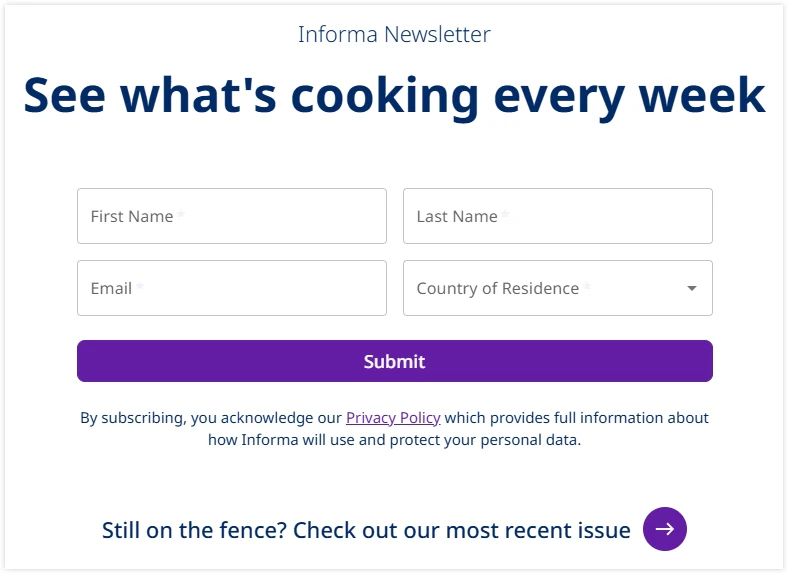
  1. Forms - Newsletter Signup:
    You can now create a custom Newsletter Signup form using Add New Form in the event’s Forms section. The Newsletter form has a fixed design, does not support additional fields, and does not display consent when a Country of Residence is selected. 

    To view the demo, click here.

  2. Image Module:
    Added the ability to apply a hyperlink to images. To view the demo, click here. 


Improvements and Bug Fixes
  1. Landing Groups: Authors can now create a landing group using the same name/path as an existing landing page. Example: 
    • mysite.com/about → page 
    • mysite.com/about/company → page (‘about’ used as a group) 
  2. Column Text - Variant 2: Fixed spacing and design inconsistencies. 
  3. Logo Display: Added a default logo height to ensure consistent appearance across viewports, and the logo does not overlap other areas of the design. 
  4. Image Gallery: Swipe arrows now display correctly on image overlays. 
  5. CTA design: Fixed a design issue to ensure vertical scroll appears properly on buttons.
 20 November 2025 
New Modules and Features
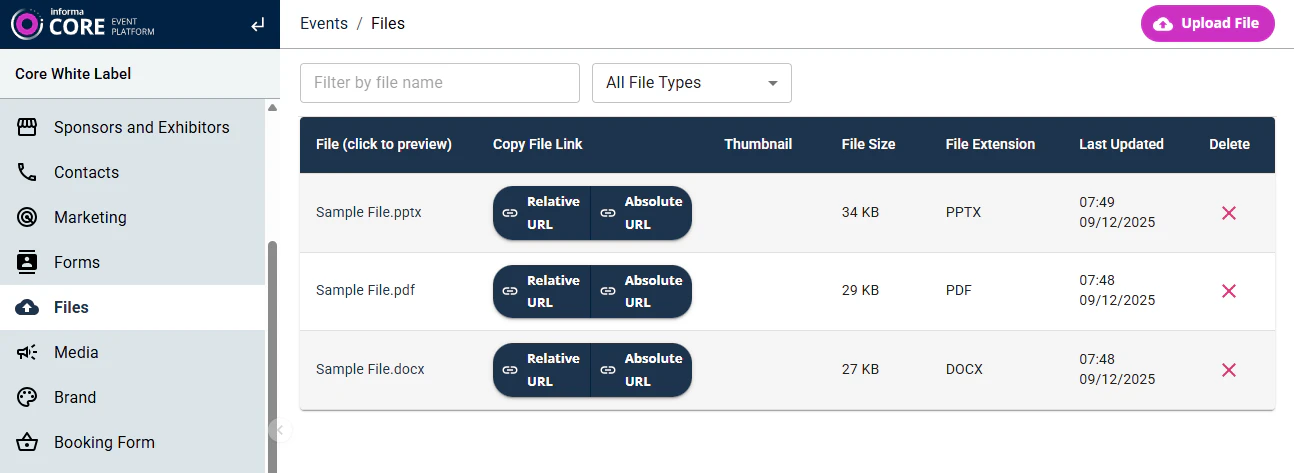
  1. Files Management: 
    Each event now includes a dedicated Files section for uploading and managing files for use across sites.


    Key Features:
    1. Supports all common file types.
    2. Absolute URL button: Copies the full URL on the site’s domain - intended for use once the site is live.
    3. Relative URL button: Copies the relative path - ideal during development of a site, pre-go-live, ensuring the file works across Preview, Publish, and Live URLs of the site.

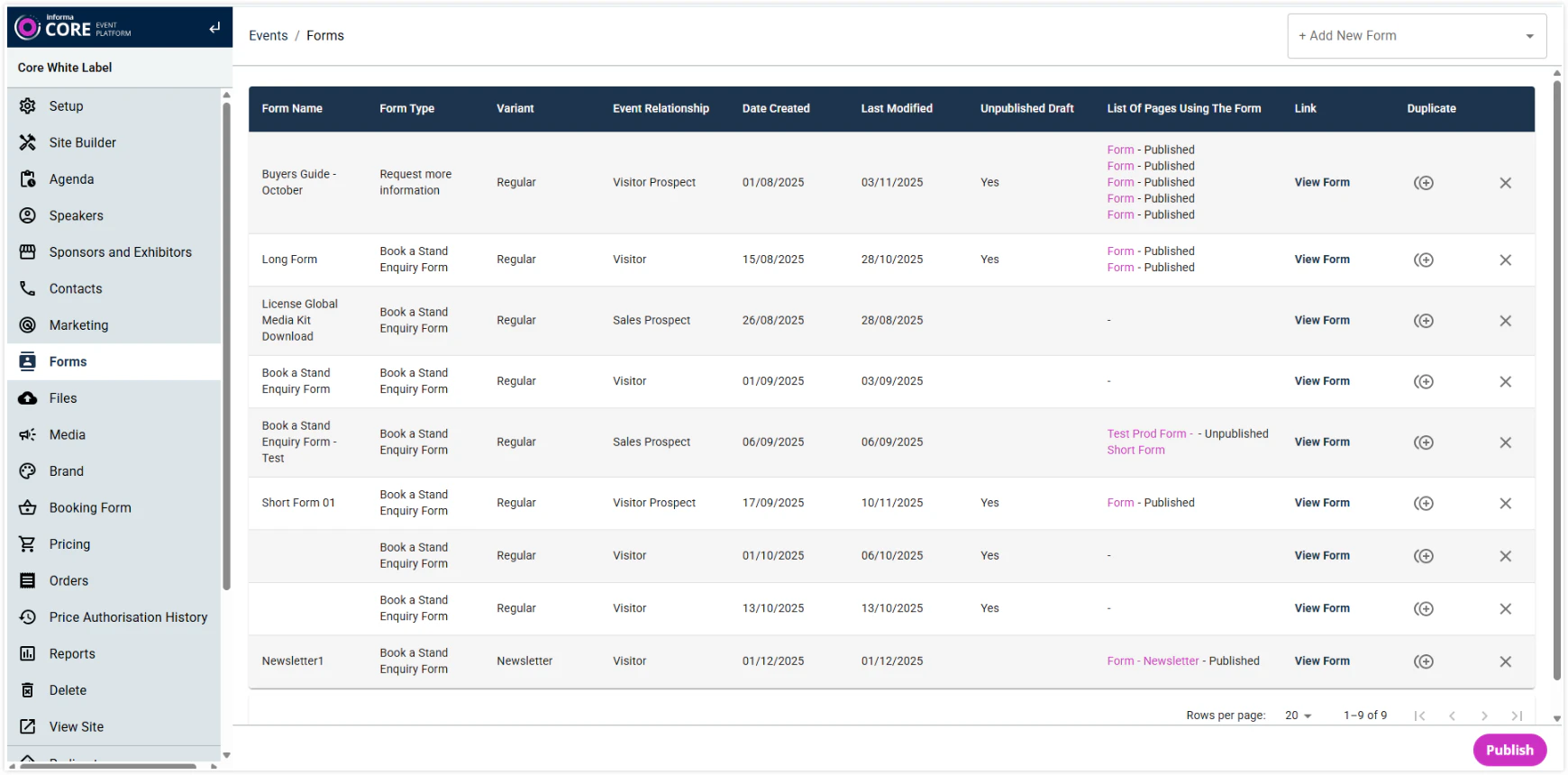
  2. Forms Duplication & Additional information: 

    Added additional information to the forms list, along with a new option to duplicate forms.


  3. Headers in Module - Image support: 

    The Header section on modules now supports an image above the Pre-Title, enabling Fashion-Hero-style designs used on AEM sites. For a demo on the Hero module, click here. 
    Note: Additional updates coming soon to replicate features used by Fashion Hero design on AEM (background video play/pause button, separate videos for different viewports).

  4. Carousel Mode of modules: Added an option to hide navigation arrows and pagination dots.

  5. Video Gallery: Added a Pre-Title field for video blocks. Demo.

  6. RSS Feed (currently named ‘SCM Featured Insights’): New module to display feeds from SCM. Demo. Note: Renaming of this module and minor design refinements are in the backlog.


Improvements and Bug Fixes
  1. Text Content: Removed “Code View” from the WYSIWYG editor to prevent accidental layout or design issues. 
  2. Column Text: Fixed icon alignment. 
  3. CTA Buttons: Resolved an issue where CTAs linked to grouped Landing Pages were not displaying.
 13 November 2025 
New Features and Module-Variants / Design extensions
  1. Column Text: Blocks now have the option to add an icon on the top of the Pre Title. To view the demo, click here.

  2. Copy Page: The Copy Page feature extended to allow copying pages between different domains/tenants in Site Builder 2.0. 

  3. Accordion > Variant 2: Accordion blocks now support creating listed items in each Accordion item to display items with icons, images, text or auto-generated numbers. To view the demo, click here: On this demo, the first 3 accordion items have different types of lists created.


Other Updates
  1. Portuguese version of “Consent Wording Group A” marketing permissions updated on forms
 06 November 2025 
New Modules, Module-Variants and Design extensions
  1. Forms: Additional domains, ones used by Markets on AEM, are added to the notification email to the 'From Email Domain' dropdown list. 

  2. Modules with Multi Column support > Display ‘First Row Only’: A new option to have only the first row of the multi-row blocks display on page-load, with a 'Show All' button that reveals the rest of the blocks. To view the demo, click here.
     
  3. Hero > Variant 5: New option to position image at the Top or Bottom for tablet and mobile resolutions. To view the demo, click here. Here, the image is on the right on the desktop and positioned to appear on top on the tablet/mobile. 

  4. Column Text > New Variant 3 to display blocks with Text-Padding and a Background colour and without Border. To view the demo, click here.


Improvements and Bug Fixes
  1. Speaker > Display Variant 3: Mouse-over/hover effect removed from the Title when it’s not hyperlinked. 
  2. Accordion: Variant 1 alignment fixes. 
  3. Image Gallery: Images not displaying in overlay for Arabic locale. 
  4. Hero Key Visual: CTAs made optional to allow the Module to be saved and used without CTAs, too.
 30 October 2025 
New Modules, Module-Variants and Design extensions
  1. Navigation now supports Mega Menu with the option to define the number of columns (up to 4 max) and an optional banner. To view the demo, check the Modules menu in the Navigation here. 
  2. Agenda - new module to display a simple list of 'agenda' with optional speakers attached to each agenda item. To view the demo, click here. 
  3. Accordion, Variant 2 (new design): Displays auto-generated number next to the title. To view the demo, click here.

Improvements and Bug Fixes
  1. Text Module: Autoplay-back for Videos placed in the editor corrected. 
  2. Form: Name and Value for a hidden field are now mandatory. Earlier, when it was optional, forms failed to submit because hidden fields were added, but name/value pairs were not configured. 
  3. Image module > CONTENT > Header > Intro Text: Font Size of Bullet and Number lists in the Intro Text field corrected.


Other Updates
  1. Added the ability to disable the loading of all third-party scripts (such as VWO, Transcend, etc) for all SB2 tenants by adding query parameter 
    '?externalScripts=disabled' to the URL.
 16 October 2025 
New Features and Module-Variants / Design extensions
  1. Pricing Cards: New module to display price comparison of products. To view the demo, click here. 
  2. Accordion Variant 1 design extended to support new elements - Pre-Titles, Speakers, Listed items, Banner image. To view the demo, click here. 
  3. Column Text: Full block can now be made clickable and also hide the CTA if not required for display. To view the demo, click here. 
  4. Drop Column – new variant, Variant 2, to display cards without a border. To view the demo, click here.

Improvements and Bug Fixes
  1. Ads: The ad fetch count is optimised to remain consistent and no longer increases on page refresh or when navigating to a new page on the same site. 
  2. Form payload field name updated from "noneStandardAnswers" to "nonStandardAnswers" (request from IIRIS). 
  3. UTM: Other URLs within the domain configured in the Marketing > Third Party URL section now successfully have UTMs appended to them as well. 
  4. Modal: Centred Modal size made bigger, as per the intended design. 
  5. Testimonials, image aspect ratio and text cut-off corrections. 
  6. Mobile / Hamburger Navigation: CTA display issue corrected. 
  7. Header Alert button cropping issue on mobile resolution corrected. 
  8. Global Footer links for non-English locales corrected to reflect links as set up in those locales.
 23 October 2025 
New Modules, Module-Variants and Design extensions
  1. New features have been added to the Exhibitor List module: 
    • ‘My Favourites’ detail page. 
    • Log-in Feature. 
    • Adding to My Favourites.

  2. Image Gallery: new variant - Variant 3, to display images in various sizes in 3 columns. To view the demo, click here. 
  3. Hero Key Visual: New module to achieve a design similar to the H1 component on AEM ESA. To view the demo, click here. - Note: There are minor UI issues which are currently being addressed. 
  4. Content Width of modules: Additional width options added under ‘Display Settings > Content Width’for all modules. This provides authors further flexibility to display modules in smaller widths. 
    • ‘Narrow Small’ - uses 6 columns of the Bootstrap grid. 
    • ‘Narrow Mid’ - uses 8 columns of the Bootstrap grid. 
    • ‘Narrow Big’ - uses 10 columns of the Bootstrap grid. 
    • Page - uses 12 columns of the Bootstrap grid. 
    • Wide - full screen with gaps/padding on the left and right. 
    • Fullscreen - edge to edge of the screen.


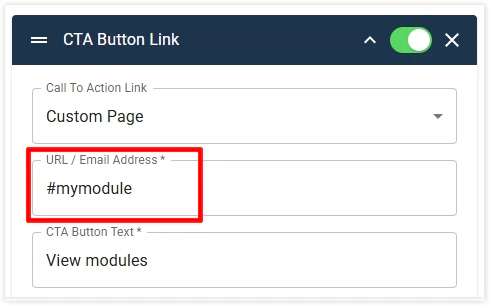
  5. CTA Buttons can now be used to link to on-page anchor link by just defining the anchor ID as shown below.

Improvements and Bug Fixes
  1. Testimonials Variant 3: Image and spacing fixes 
  2. Misc. Forms enhancements and fixes
    1. The issue with Tooltips displaying on mobile. 
    2. Product categories/Interest fields tree display issues. 
    3. Form labels of top fields cutting off in Fullscreen Content width.
 09 October 2025 
Improvements and Bug Fixes
  1. Fixed various Admin UI issues in the SPEX module. 
  2. Corrected the Copy Page published state behaviour. 
  3. Resolved an issue where text colours in Display Styles were not applied correctly for users without the site_builder_designer permission. 
  4. Fixed the Preview Pane not reflecting saved changes accurately. 
  5. Corrected Anchor link URLs generated for modules with numbers in their names. 
  6. The Authoring Modal now displays the correct design in the left preview pane. 
  7. Global Footer changes now appear immediately on live sites without requiring cache clearance. 
  8. Header Variant 2 > Logo: Fixed logo display on Retina/Hi-DPI screens. Small logos now scale correctly to fit the container. For best results, upload a high-resolution logo (minimum 800 px wide). 
  9. Updated all published URLs (as per attached sheet) to relative or live URLs, ensuring all live URLs include www.
 02 October 2025 
Improvements and Bug Fixes
  1. On modules with images, Image Display Settings now shows the 'Position' dropdown when Image Size = Fill. Previously, it displayed only when 'Image Size' = 'Fit'. 
  2. Text Content: Removed 'Style > Content > Text Content Body' from Text Content module as there are multiple types of text styles in this editor (Regular, H1, H2, etc) which are now controlled from the Theme. 
  3. Text Content: Header Intro Text style not working on the module. 
  4. SPEX title always shown in English and not displaying correctly as per the locale.
  5. Misc. Localisation and Translation fixes. 
  6. Speaker logos alignment fix.
 25 September 2025 
New Module
  1. Modal – Modals can be setup under the new Modal section on the Site Builder landing page. There are 2 types of modals. Click the links below to view the demo:
Improvements and Bug Fixes
  1. Removed the default hover effect from Blocks in Drop Column, Column Text, and Speakers modules. Note: If the hover effect still appears, it may be caused by custom styling. Please reach out to your Core contact for adjustments.
  2. Pasting into editors within modules now strips all formatting from copied text, except hyperlinks.
  3. Updated tenants to include www in the sitemap.xml.
  4. Hotelmap - Fixed loading issue by adding the required code for compatibility with React UI.
  5. Custom Form module - Thank-you page URLs now work correctly on both Preview and Published environments. 
  6. Tiles with Navigation - Fixed issue where link text displayed incorrectly when wrapping to two lines.
 18 September 2025 
New modules and Features
  1. Table: The new responsive Table module delivers a cleaner, more intuitive experience with full mobile optimisation. Instead of forcing users to zoom or navigate oversized tables, the module reorganises content into a touch-friendly, scrollable structure. This is ideal for price comparisons, product matrices, and any content that relies on concise side-by-side data. Faster to build, easier to read, and far more engaging for users. For demo, click here.

  2. Tiles with Anchor Navigation: Tile-based module featuring automatic anchor links. Users can quickly jump between tiles through a menu at the top of the page, making long-form content easier to explore. Ideal for outlining steps, showcasing options, or promoting event experiences. For demo, click here.

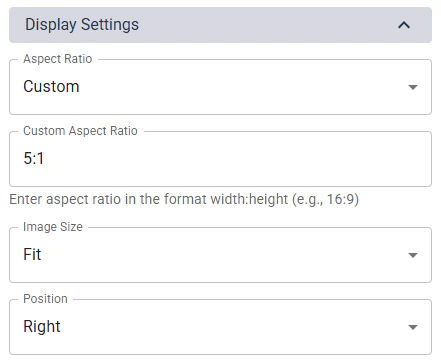
  3. Module with images: New Aspect Ratio and Custom Aspect Ratio options added to better manage image sizing on the pages. 

Improvements and Bug Fixes
  1. Removing the pathname requirement for the primary event in multi-site tenants. This allows the parent site in multi-site tenants to be set up to load without /home in the URL. 
  2. Ad slot updates, as per the new Ad Slot Specifications, to standardise the Ad implementation on Site Builder 2.0. 
  3. Form: Enabled Hidden Fields on Form configuration to be sent to the Form payload, allowing Salesforce data capture.
  4. Text Content module: Font size for each Paragraph Format option in the text editor is defined from the Theme. Note: Text Module > STYLE > Content > Text Content Body > Text Style is redundant and will be removed. 
  5. Hotel Map base page: Added 'Display Page Title in the Page Body' to allow authors to show or hide the Page Title. 
  6. Footer > Social icons: Fixes spacing issue on Arabic site
 11 September 2025 
New Feature
  1. Relative URLs: Authors can now define relative URLs for hyperlinks and navigation so those links work across Preview, Published, and Live URLs. For demo, click here.
 04 September 2025 
New modules and Features
  1. Registration Options: Module for showcasing event pass options. Authors can display pricing, benefits, promotional offers, and registration buttons in a clean, user-friendly layout. Optimised for both desktop and mobile, this module helps streamline the registration journey. For demo, click here.

  2. Image module: A new Content Width option to display the image edge-to-edge of the screen. For demo, click here.

Improvements and Bug Fixes
  1. Forms > The Marketer Notification email: Improved the email template by listing additional data from most form fields and certain required values from the form configuration.


 28 August 2025 
New Variants and Features
  1. Testimonial module: new variants – Variant 2 and Variant 3 – each with a distinct design to display testimonials. 
  2. Image module: Option to place text on the bottom right of the image that can serve as a caption. For demo, click here.

Improvements and Bug Fixes
  1. Forms: Updated to allow multiple 'Nature of Business' fields to be placed on a single form.
  2. Engage Ads system is enabled on Core Site Builder 2.0.
  3. Form API Endpoint Update to improve and fix data capture. 
  4. Persisting UTMs across the pages. 
  5. Form Thank you page misc. fixes. 
  6. Form Localisation fixes made for gaps identified in the GDPR/Consent feature. 
  7. Alert Banner alignment fixes.

 21 August 2025 
New modules and Features
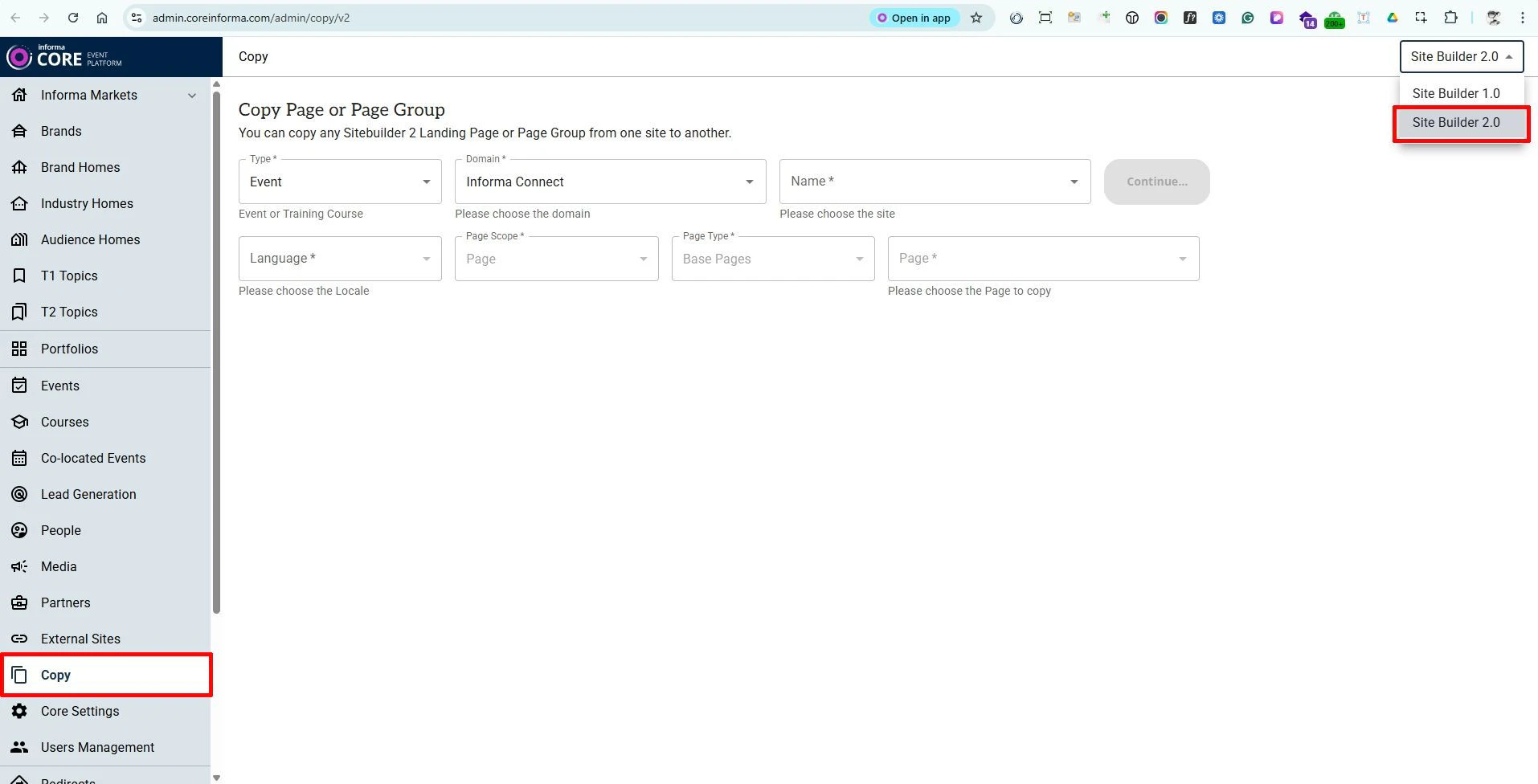
  1. Copy Tool: The Copy tool on Core now supports duplicating full pages - either within the same site or across other sites you have access to. The tool is available in the left-hand panel, outside of each Event (website). Click here to access the tool directly in the Production environment. - Note: When copying pages from Site Builder 2.0 sites, ensure that “Site Builder 2.0” is selected in the dropdown menu at the top-right of the Copy section.


  2. Pre Footer: The Pre-Footer is a configurable area that sits directly above the existing site footer and can contain any standard modules. Content placed here automatically appears across all pages of the website, allowing authors to create shared elements - such as sponsor logo lists - once and reuse them globally. The Pre-Footer can also be disabled at the page level if it should not appear on specific pages.


 14 August 2025 
New Variants and Features
  1. Hero Module, new variant: Variant 5 displays the image on the right or left of the text. 
  2. Hero Module, new Footer variant design to display module footer text in a coloured background.
 07 August 2025 
New modules and Features
  1. Navigation: Authors can now choose to hide the Home page from the main navigation. 
  2. Website Logo: A new configuration option lets authors set the logo height in the Header. 
  3. A new Header Alert feature is now available as part of the website Header. Authors can choose to display the alert either above or below the Header. For demo purposes, scroll up to view the banner positioned below the navigation. The banner can also be set to remain fixed (non-scrolling). 
  4. A new Countdown module has been added. For demo, click here. 
  5. Speakers Module, new variants - Variant 2 and Variant 3 are now available for the Speakers module, offering additional design options. Variant 3 also allows authors to highlight selected speakers using larger card designs. 
  6. CTA Button Group, new variant - A new design option (Variant 2) has been added to the CTA Button Group, displaying CTAs in a cleaner layout with each button separated by a dot.

Improvements and Bug Fixes
  1. Form – Interest Field: Resolved an issue where not all values were appearing in the list of values (LOV).
  2. Form – Consent Text: Corrected the event name displayed within the consent text.
  3. Form – Arabic Labels: Fixed alignment issues affecting field labels in Arabic.
  4. Form – Fields UI: Addressed various user interface display issues related to form fields.
  5. Text Wrapping: Corrected inconsistent or incorrect text wrapping across multiple components.
 July 2025 
New Modules and Features
  1. UTM Tracking: Cross-domain tracking with the new UTM Tracking feature.
  2. Exhibitor Listing: Showcase exhibitor details, sourced from MarketMakr.
  3. Copy Module Feature: Copy existing modules across the same or different pages of other 2.0 websites.
  4. Transcend Cookies Support: Full support for Transcend cookies on Site Builder 2.0 sites, ensuring compliance and better cookie management.

Improvements and Bug Fixes
  1. Theme Enhancements: Gradient colour codes are now validated before saving.
  2. Form Improvements:
    1. Various fixes for dark style forms and user interface corrections.
    2. Email validation added for ‘Mail To,’ ‘Mail CC,’ and ‘Mail BCC’ fields in the Marketer Notification tab, preventing errors during form setup.
    3. Helper text added to guide authors on saving email addresses correctly in the Marketer Notification tab.
  3. Image Uploads: Support for displaying WebP images when browsing for uploads on Windows, improving compatibility and user experience.
 08 October 2026 
New Feature
  1. New HotelMap Module

    A new HotelMap module is now available, making it easy to display hotel information on event landing pages.

    The module displays an interactive HotelMap and its associated hotel listings based on the configured HotelMap Code.

    Authors can:
    - Enter the HotelMap Code to display the relevant hotel map and listings.
    - Place the HotelMap alongside other modules on a landing page.
    - Optionally provide a Source API URL to pass additional query parameters to the HotelMap API and customise the information displayed.

    Source API URL format:
    https://hotelmap.com/api/html/v2/listing?m=[Hotel Map Code]&[Additional Query Parameters]

    The Source API URL is optional. When provided, the additional query parameters are appended to the HotelMap request alongside the Hotel Map Code.

    For a demo, click here.


Improvements & Fixes
  1. Sites - Improved Site Management in Site Builder

    The Sites section in Site Builder has been improved and developed to replace the Events section of the CMS, providing a more centralised way to find, filter and manage Informa sites.

    Updates include:
    - SB1 Events are now included in the Sites list.
    - New Site Builder Version and Series Type columns have been added.
    - The Domain column now displays the actual domain, making sites easier to identify.
    - Sorting is now available across all columns.
    - New and improved filters make it easier to find sites by Domain, Site Builder Version, Site Type, Sector, Sub Sector and Brand.
    - One Informa taxonomy - Sector, Sub Sector and Series Type - is now displayed in the table.
    - The table has been improved for smaller screen sizes, with horizontal scrolling where needed.
    - Other minor improvements and fixes.

    These improvements make the Sites page easier to navigate and provide a clearer view of key information across both SB1 and SB2 sites.


  2. File Upload Security Improvements

    File uploads now include additional security validation to ensure only approved and supported file types can be uploaded to Site Builder.

    The upload process checks each file against the approved list, even when “All Files” is selected in the Windows file picker. This provides an additional layer of protection against unsupported or potentially unsafe files.


  3. OI Taxonomy Category Edit History

    You can now view the Edit History for each Sector and Sub Sector added under Content Meta Data > Categories on Core.

    This makes it easier to see what changes were made and when for each category.

  4. IIRIS Forms – State of Residence for Mexico

    On IIRIS Forms, the State of Residence field is now displayed when a user selects Mexico as their Country of Residence.

  5. Sites section - Performance Improvements

    The Sites section of Core has been optimised to load faster and respond more quickly, providing authors with a smoother and more efficient experience when managing sites.

  6. Rich Text Editor - Width Restored

    A display issue that caused the Body rich-text editor in Site Builder 2 modules to appear unusually narrow has been fixed.