
This site is part of Informa PLC

This site is operated by a business or businesses owned by Informa PLC and all copyright resides with them. Informa PLC's registered office is 5 Howick Place, London SW1P 1WG. Registered in England and Wales. Number 3099067.

Informa logo

This is the Alert Banner in the Header

Core Site Builder 2.0 - Releases

 5, 12, 19 March 2026 
New Modules and Features
  1. ‘Brand’ and ‘Edition Format’ Meta Content (One Informa Taxonomy)
    New metadata fields for Brand and Edition Format have been added under Core Settings > Content Meta Data, in line with One Informa Taxonomy requirements. 
    Access to these settings is restricted to authorised users only.

  2. Copy Event to Root Tenant (Super Users Only)
    A new option allows Super Users to copy a website directly to the root of a tenant, provided the destination tenant is configured as a root tenant.
    Note: This action will overwrite any existing site at the root level. Please use with caution to avoid unintended content loss.


  3. Files - Recycle Bin
    The Files section now includes a Recycle Bin. Deleted files are moved to the Recycle Bin and can be restored by authors if needed.
    Note: Files deleted prior to this feature release are also available in the Recycle Bin and can be restored.

Improvements and Bug Fixes
  1. Copy Event - Enhancements
    • When pages are copied as part of the Copy Event process, the “Make this page live” toggle state is now preserved (i.e., it remains on or off as per the source site).
    • All copied sites will have the “Make this site live” toggle turned off by default, regardless of the source site’s status. This ensures copied sites do not go live unintentionally and must be explicitly published.

  2. Arabic Layout Fixes
    Addressed various design and layout issues across Arabic (right-to-left) websites.
 26 February 2026 
New Features
  1. Site Builder 2 sites on SB1 Tenants
    Site Builder 2 sites can now be created on tenants originally configured for Site Builder 1.
    This enables both SB1 and SB2 sites to coexist under the same domain, providing greater flexibility during migration and rollout.

  2. HTML Block - Search by Name (Super Users Only)
    The Admin UI now includes a search option to find HTML Blocks by name, making it easier for Super Users to locate and manage existing blocks.


  3. Newsletter Form
    The Newsletter Form has been updated to include a “Session” field to support required data collection needs.

Improvements and Bug Fixes
  1. Table & Text Content Modules
    Removed redundant in-editor alignment options for cleaner authoring.
    Note: The primary text alignment controls in the editor toolbar remain unchanged.

  2. Header - Variant 3
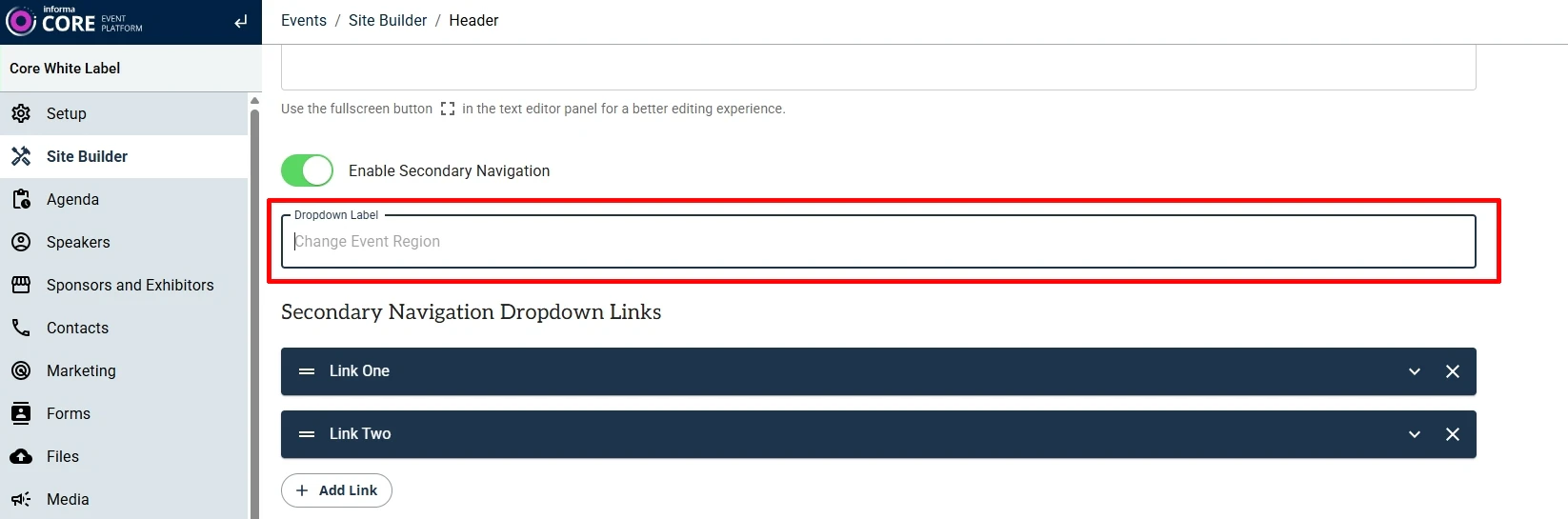
    In the Secondary Navigation dropdown links, the label “Change Event Region” was previously hard-coded.
    This has been updated to allow a customisable dropdown title, with “Change Event Region” set as the default value.

  3. Exhibitor List
    Resolved an issue where the Exhibitor List did not display for certain Event Edition Codes.

  4. Arabic Layout Fixes
    Minor alignment and layout issues have been corrected for Arabic (right-to-left) layouts in the Hero module.


 19 February 2026 
New Features
  1. New Meta Content for One Informa Taxonomy
    New metadata fields have been introduced for Sector (Industry) and Sub-Sectors (Topic) under Core Settings > Content Meta Data > Categories, in line with One Informa Taxonomy requirements. Access to these settings is restricted to authorised users only.

Improvements and Bug Fixes
  1. Site Builder Version Selector on SB2.0
    The Site Builder version dropdown is now permission-controlled to prevent users from accidentally switching versions. 
    This update also resolves a caching issue that previously caused the site version not to update correctly after being changed.

  2. Module Size Limitation
    Module size is now restricted to 1MB to prevent issues related to excessive page size and performance.

  3. Arabic Layout Fixes
    Minor alignment and layout issues have been resolved for Arabic (right-to-left) layouts in the Testimonial and Tiles with Navigation modules.
 12 February 2026 
New Modules and Features
  1. Visual Editor – Live Page Preview
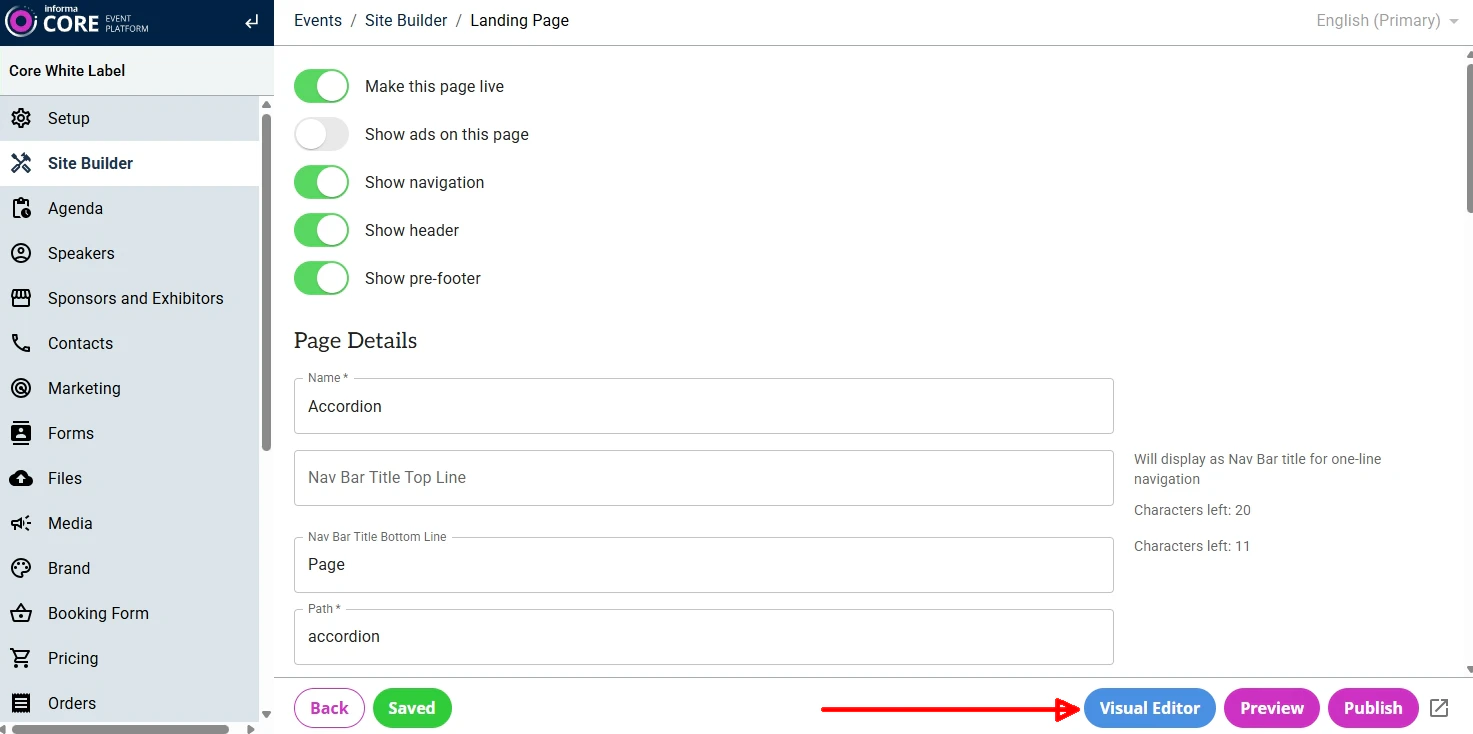
    A Visual Editor enhancement has been introduced to display the full page in the Preview Pane while authoring, providing a more accurate real-time editing experience.
    Click on the “Visual Editor” button to launch the full-page edit mode.


  2. Open Graph Image Support (SB2.0)
    Open Graph image support is now available for Site Builder 2.0 sites.
    The image uploaded under Marketing > Social Sharing Image will now be rendered as the Open Graph image across all pages of the site, improving social media sharing previews.

Improvements and Bug Fixes
  1. Footer Display Fix
    Previously, an empty Footer displayed blank space on the page. This has been corrected - the Footer will no longer render if it is not populated.
  2. Mega Menu - Promotion Section
    Addressed an issue where the Promotion section left an empty (black) space when not enabled. The section now collapses properly when disabled.
  3. Copy Event
    Various fixes and stability improvements applied to the Copy Event functionality.
 05 February 2026 
New Feature
  1. UTM Parameters for iFramed URLs
    The iFrame module has been updated to support appending UTM parameters to iFramed URLs.
    Note: The domain of the iFramed URL must be configured in the Marketing > Third Party URLs section of the site.

  2. Core Settings Admin UI Update (Super Admins Only)
    Minor updates have been made to the Core Settings Admin UI to support upcoming sections related to OI taxonomy work.

Improvements and Fixes
  1. Forms - Display Style Fix
    Fixed an issue where autofilled form-field values in Chrome were not visible when using the Standard (white) Display Style. Autofilled values are now displayed correctly.

 29 January 2026 
New Modules and Features
  1. List Tags Module
    A new lightweight listing module for displaying feature tags, helping readers quickly scan content and understand relevance at a glance.
    For demo, click here.
    Note: Additional enhancement to control the colour of the tags is pending release.

  2. Custom Themes for Non-Primary Languages
    Support has been added for applying custom themes per site language, allowing different fonts and font sizes for non-primary locales when they differ from the primary language site.
    Note: Fonts defined in the Brand section of an Event will not override fonts on non-primary locales if a different theme is applied to those locales.

  3. Sub-Folder Support in Site URLs
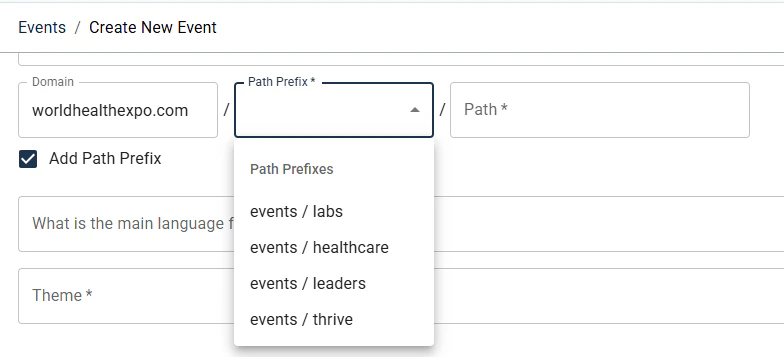
    Sites can now be created using sub-folder URL structures by enabling the Path Prefix option.
    Example: www.myevent.com/section/sub-section/eventname/

    To add a Path Prefix during Event creation, select the “Add Path Prefix” checkbox and choose a predefined Path Prefix from the dropdown. Path Prefixes are configured in the tenant’s configuration file, and additional prefixes can be requested via ServiceNow.


Improvements and Bug Fixes
  1. Table Module
    The Table Content editor now supports text alignment within table cells, providing greater control over table presentation.


  2. Copy Page
    Base pages can now be copied from one locale to another within the same site.

  3. General Fixes
    Addressed various design-related issues in the Header and Table modules.
 22 January 2026 
New Feature
  1. Copy Site Support (Super Users Only)
    Site Builder 2.0 now supports the Copy Site feature within the Copy tool (available to Super Users only). For marketers, this means a full website can be duplicated to quickly set up a new site with a significantly faster turnaround time.

  2. Image Gallery - Variant 4
    A new Variant 4 has been added to the Image Gallery module, displaying the image title overlaid on top of each image.
    For a demo, click here.

  3. Video Gallery - Variant 3
    A new Variant 3 has been introduced for the Video Gallery module, displaying both the video title and pre-title overlaid on the video.
    For a demo, click here.

  4. Module Header Width Control
    A new Header Width option has been added to the Style tab of all modules, allowing authors to control the display width of module headers independently from the module content.

  5. Header Variant 3 – Inline Navigation Enhancements
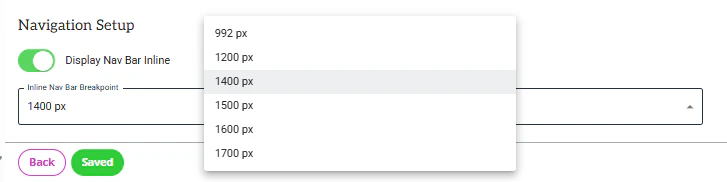
    On Header Variant 3, when the “Display Nav Bar Inline” option (under Navigation Setup) is enabled, the navigation is displayed in the same row as the logo.
    Additional breakpoint options have now been added to the Inline Nav Bar Breakpoint setting, and existing values have been renamed for clarity.

    How it works:
    When 'Display Nav Bar Inline' is enabled, navigation may need to wrap below the logo on smaller desktop screen sizes, depending on the number and length of menu items. This behaviour can be controlled using the Inline Nav Bar Breakpoint setting. This provides greater control over navigation layout across different desktop screen sizes.

    • Selecting 992px → Navigation wraps when the screen width is 992px or below
    • Selecting 1200px → Navigation wraps when the screen width is 1200px or below
    • Selecting 1400px → Navigation wraps when the screen width is 1400px or below
    • Selecting 1500px → Navigation wraps when the screen width is 1500px or below
    • Selecting 1600px → Navigation wraps when the screen width is 1600px or below
    • Selecting 1700px → Navigation wraps when the screen width is 1700px or below
 15 January 2026 
New Features
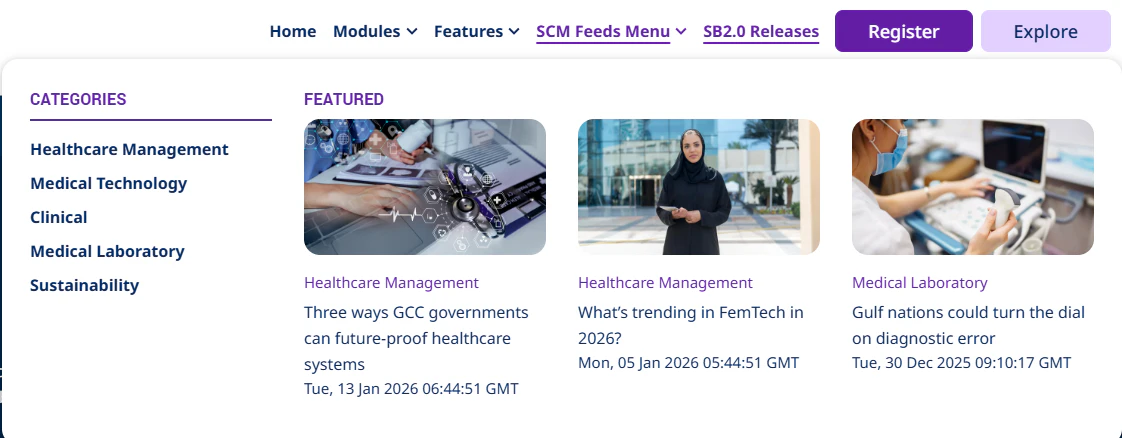
  1. Navigation Mega Menu - SCM Feed Integration
    The Navigation Mega Menu now supports displaying article categories and sub-categories along with featured article thumbnails from the SCM feed.
    For a demo, hover over the “SCM Feeds Menu” on this website.

  2. Copy Tool - Permission Update
    All users with access to log in to Core now have access to the Copy tool by default. Users will continue to see and copy only the sites they have permission to access.

  3. UTM Cookie Update
    The utm_parameters cookie max-age has been updated to 30 days for all Site Builder 2.0 (SB2.0) sites on Core.

  4. New Base Theme - MAR
    A new base theme, MAR, has been developed to reflect the specific styling requirements for ESA market websites.

Improvements and Bug Fixes
  1. RSS Feeds Module: The module has been renamed to “RSS Feeds” (previously “SCM Featured Insights”). Issues related to image aspect ratio handling from the feed have also been corrected.
  2. List Module - Variant 2: Fixed icon alignment issues.
  3. Header - Variant 3: Reduced paragraph spacing for the Logo Side Text option.

  4. Testimonials Module: Corrected the testimonial text markup to render using a <p> HTML tag instead of <h2>.
 08 January 2026 
New Feature
  1. Column Text - Multiple CTAs per Block
    The Column Text module now supports multiple CTAs / buttons within a single block, providing greater flexibility for linking to multiple actions from the same content area.

Improvements and Bug Fixes
  1. Header - Variant 3 
    Minor UI fixes and visual improvements applied.
  2. List Module
    Added missing List Item Block style options under Style > Content, giving authors more control over list presentation.
  3. Hero Module
    Fixed an issue where extra spacing appeared above the module footer when Margin Bottom was defined. The spacing is now applied correctly below the footer.
  4. Image Gallery - Variant 3
    Resolved an intermittent issue that caused a 500 error to be displayed in certain scenarios.
 18 December 2025 
New Modules and Features
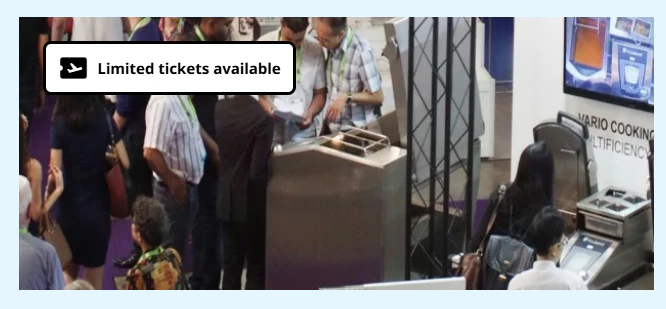
  1. Image Tag with Icon (New Option)
    A new option is now available to display a tag with an icon on images within supported modules. This helps highlight key information or statuses directly on imagery.
    For a demo, click here.

  2. SPEX Category - Variant 3
    This variant allows multiple categories to be displayed side by side, showing logos from all selected categories in a single row. The organisation name appears above each image, while category names are intentionally hidden for a cleaner layout.
    For a demo, click here.

Improvements
  1. Accordion & Tiles with Navigation - Button Alignment
    A new configuration option allows authors to control button alignment within blocks of the Accordion and Tiles with Navigation modules.

  2. General Fixes and Improvements:
    1. Image display issues on mobile layouts.
    2. Theme font colour not applying correctly in some modules.
    3. Pages returning a 404 error after being moved to a group when viewing the published version.
    4. Design inconsistencies in Accordion Variant 2.
    5. Background video mute icon colour corrected for Dark display style.
 11 December 2025 
New Modules and Features
  1. Clickable Phone Numbers in CTAs and Hyperlinks
    • The "tel:[number]" functionality can now be configured in all modules, similar to the "mailto" feature.
    • This allows users to tap or click a phone number on a webpage to initiate a call directly from supported devices.
    • View Demo

  2. Column Text module - Pre-Title Fields
    • Two new fields - Pre Title 1 and Pre Title 2 - have been added to the Column Text module. These optional fields appear above the block title and can be used to add supporting or contextual information.
    • View Demo

  3. Hero Module: New Header Variant
    • A new Style > Header Variant 4 option is now available in the Hero module, allowing authors to apply specific header text spacing for this design. 
    • This allows for specific header text spacing tailored to this design.
    • Examples:
  4. Text Content Module: Horizontal Line Option
    • A new option has been added to the editor of the Text Content module, allowing users to insert a horizontal line between text elements.
    • View Demo

  5. Page-Level Ads Toggle (Super Users Only)

    A new “Show ads on this page” toggle has been added to the Admin UI of each page. 
    Available to Super Users only, this setting allows administrators to enable or disable advertisement banners on a per-page basis.
    Note: When the toggle is turned OFF, ad units and scripts are not loaded or rendered on the page, and ad impressions are not counted.
    Additional note: If you would like ads to be disabled on any page of your site, please raise a ServiceNow ticket for assistance.

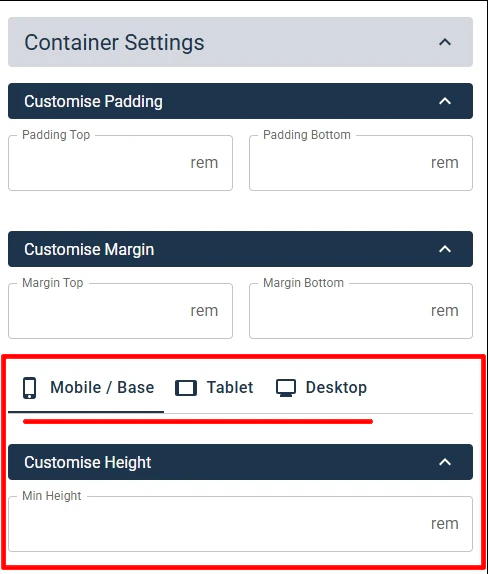
  6. Module Height Customisation by Viewport
    • Designers now have additional options to customise module height independently for Desktop, Tablet, and Mobile viewports.
    • These settings are available under module's Settings > Container Settings > Customise Height.
    • By default, Min Height is empty for all viewports.
    • If Min Height is set for Mobile only, the same value will apply to Desktop and Tablet unless overridden.
    • Min Height defines the minimum container height; the module may expand further if content exceeds the defined value.
    • Demos:
Improvements and Bug Fixes
  1. Hero Key Visual: Minor design fixes applied across all resolutions (desktop, tablet, and mobile).
  2. UTM Support for Hyperlinks: UTM parameters can now be appended to third-party URLs added as hyperlinks within module editors. Previously, this was supported only for Buttons/CTAs.
  3. Miscellaneous Design and Functionality Fixes
    • Various design and functionality issues resolved in the Hero, Modal, and Accordion modules (Variant 2).
    • Fixed style issues for Buttons in the Text Variant.
  4. Copy Module's URL: The Copy URL feature across all modules now correctly copies the URL with the appropriate anchor ID.
  5. Testimonials Module (Variant 1): Fixed image overflow issues on mobile and tablet views.
  6. Navigation Bar - Custom Links: The Open in new tab toggle now opens links in a new window correctly.
 04 December 2025 
New Modules and Features
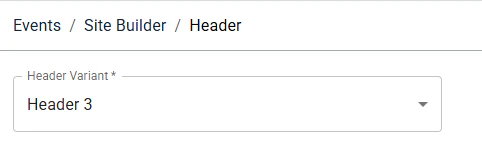
  1. Header Variant 3

    A new Header Variant 3 is now available, offering more layout and navigation flexibility. 

    This website now uses Header Variant 3.
    Note: Additional improvements are in progress

    Key Features:
    1. Navigation can be positioned to the right of the logo, with controls for when it wraps below, while keeping the right-side buttons fixed on the right.
    2. Right-side buttons can be styled independently.
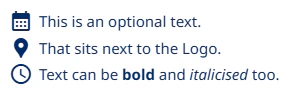
    3. Optional text and icons can now be placed beside the logo.
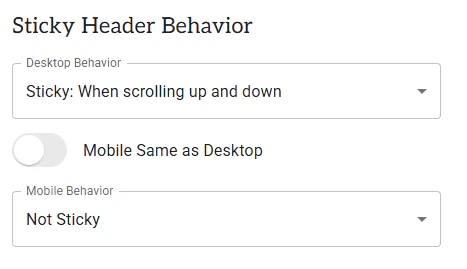
    4. New sticky header options for Desktop, Tablet, and Mobile, including scroll-up and scroll-up/down behaviours, with separate mobile controls.
    5. Desktop dropdown and Mega Menu follow Variant 2 behaviour; the mobile menu remains unchanged.

  2. Header in Modules: New Icon Placement Option
    A new icon field is now available, allowing you to place an icon above the Pre Title in module headers. 
    For a demo, click here.  

  3. List Module (New)
    A new List module, offering four design variants to help you create and present listed content more effectively. 
    Explore the demo variants below:
  4. Column Text: New Variant 4
    A new Variant 4 for Column Text, allows displaying bold card-style layouts in multiple sizes.
    For a demo, click here.

  5. Background Video Enhancements
    - Support added for separate background videos for desktop and mobile.
    - New sound control button, muted by default and user-controlled.
    For a demo, click here.


Improvements
  1. Image gallery, Variant 3: added support for reversing the image order for the Arabic locale.
  2. On Forms, on the Phone field, the 'Phone Number Country Code' has been moved to display above the 'Phone Number Area Code'.
 27 November 2025 
New Modules and Features
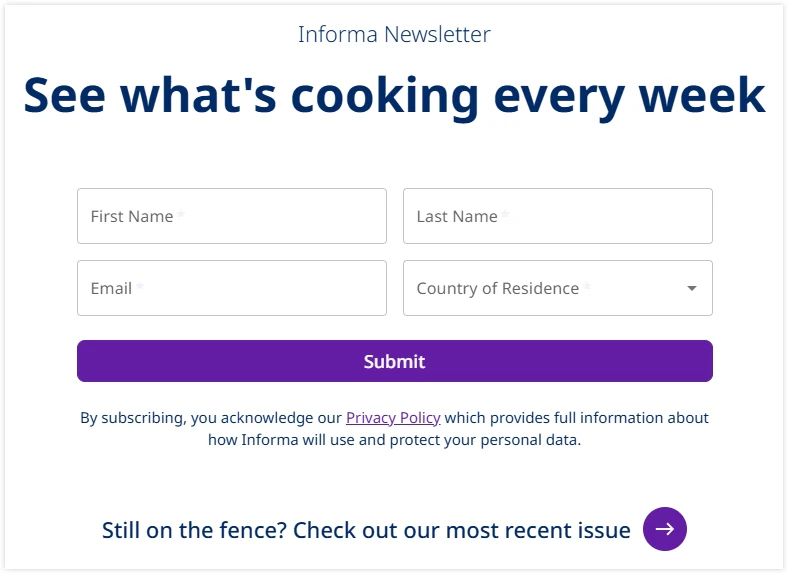
  1. Forms - Newsletter Signup:
    You can now create a custom Newsletter Signup form using Add New Form in the event’s Forms section. The Newsletter form has a fixed design, does not support additional fields, and does not display consent when a Country of Residence is selected. 

    To view the demo, click here.

  2. Image Module:
    Added the ability to apply a hyperlink to images. To view the demo, click here


Improvements and Bug Fixes
  1. Landing Groups: Authors can now create a landing group using the same name/path as an existing landing page. Example: 
    • mysite.com/about → page 
    • mysite.com/about/company → page (‘about’ used as a group) 
  2. Column Text - Variant 2: Fixed spacing and design inconsistencies. 
  3. Logo Display: Added a default logo height to ensure consistent appearance across viewports, and the logo does not overlap other areas of the design. 
  4. Image Gallery: Swipe arrows now display correctly on image overlays. 
  5. CTA design: Fixed a design issue to ensure vertical scroll appears properly on buttons.
 20 November 2025 
New Modules and Features
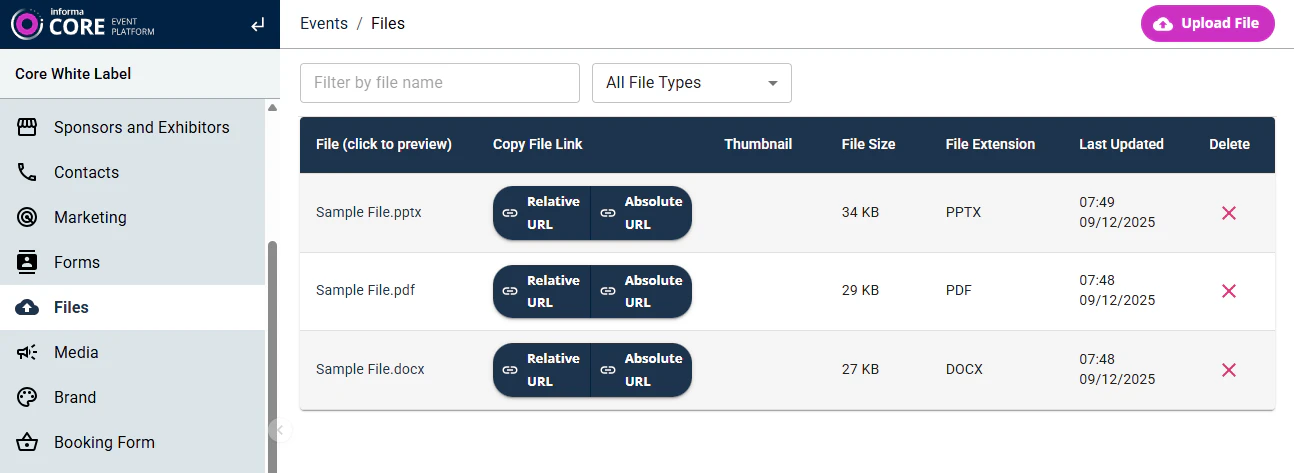
  1. Files Management: 
    Each event now includes a dedicated Files section for uploading and managing files for use across sites.


    Key Features:
    1. Supports all common file types.
    2. Absolute URL button: Copies the full URL on the site’s domain - intended for use once the site is live.
    3. Relative URL button: Copies the relative path - ideal during development of a site, pre-go-live, ensuring the file works across Preview, Publish, and Live URLs of the site.

  2. Forms Duplication & Additional information: 

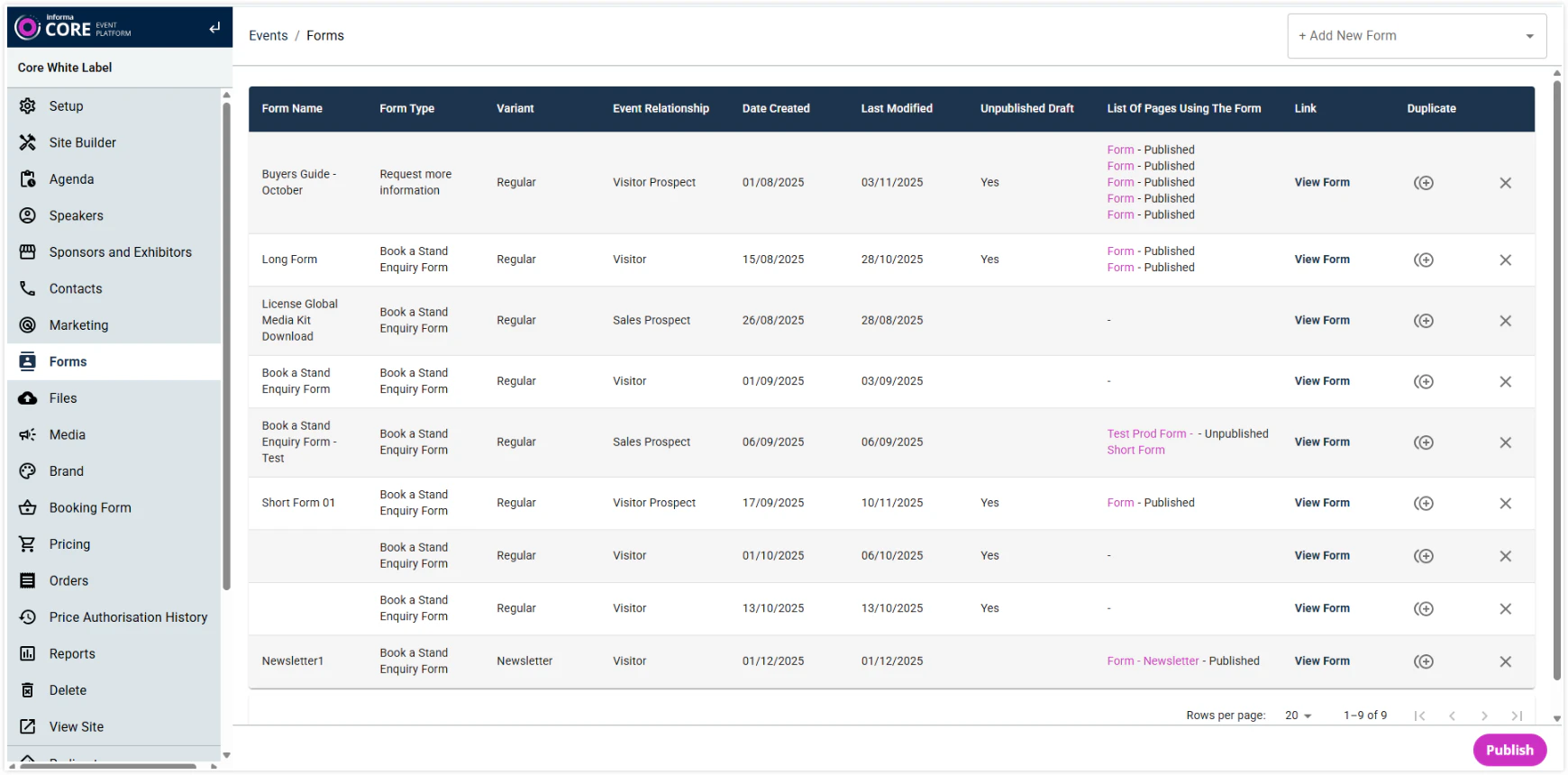
    Added additional information to the forms list, along with a new option to duplicate forms.


  3. Headers in Module - Image support: 

    The Header section on modules now supports an image above the Pre-Title, enabling Fashion-Hero-style designs used on AEM sites. For a demo on the Hero module, click here
    Note: Additional updates coming soon to replicate features used by Fashion Hero design on AEM (background video play/pause button, separate videos for different viewports).

  4. Carousel Mode of modules: Added an option to hide navigation arrows and pagination dots.

  5. Video Gallery: Added a Pre-Title field for video blocks. Demo.

  6. RSS Feed (currently named ‘SCM Featured Insights’): New module to display feeds from SCM. Demo. Note: Renaming of this module and minor design refinements are in the backlog.


Improvements and Bug Fixes
  1. Text Content: Removed “Code View” from the WYSIWYG editor to prevent accidental layout or design issues. 
  2. Column Text: Fixed icon alignment. 
  3. CTA Buttons: Resolved an issue where CTAs linked to grouped Landing Pages were not displaying.
 13 November 2025 
New Features and Module-Variants / Design extensions
  1. Column Text: Blocks now have the option to add an icon on the top of the Pre Title. To view the demo, click here.

  2. Copy Page: The Copy Page feature extended to allow copying pages between different domains/tenants in Site Builder 2.0. 

  3. Accordion > Variant 2: Accordion blocks now support creating listed items in each Accordion item to display items with icons, images, text or auto-generated numbers. To view the demo, click here: On this demo, the first 3 accordion items have different types of lists created.


Other Updates
  1. Portuguese version of “Consent Wording Group A” marketing permissions updated on forms
 06 November 2025 
New Modules, Module-Variants and Design extensions
  1. Forms: Additional domains, ones used by Markets on AEM, are added to the notification email to the 'From Email Domain' dropdown list. 

  2. Modules with Multi Column support > Display ‘First Row Only’: A new option to have only the first row of the multi-row blocks display on page-load, with a 'Show All' button that reveals the rest of the blocks. To view the demo, click here.
     
  3. Hero > Variant 5: New option to position image at the Top or Bottom for tablet and mobile resolutions. To view the demo, click here. Here, the image is on the right on the desktop and positioned to appear on top on the tablet/mobile. 

  4. Column Text > New Variant 3 to display blocks with Text-Padding and a Background colour and without Border. To view the demo, click here.


Improvements and Bug Fixes
  1. Speaker > Display Variant 3: Mouse-over/hover effect removed from the Title when it’s not hyperlinked. 
  2. Accordion: Variant 1 alignment fixes. 
  3. Image Gallery: Images not displaying in overlay for Arabic locale. 
  4. Hero Key Visual: CTAs made optional to allow the Module to be saved and used without CTAs, too.
 30 October 2025 
New Modules, Module-Variants and Design extensions
  1. Navigation now supports Mega Menu with the option to define the number of columns (up to 4 max) and an optional banner. To view the demo, check the Modules menu in the Navigation here
  2. Agenda - new module to display a simple list of 'agenda' with optional speakers attached to each agenda item. To view the demo, click here
  3. Accordion, Variant 2 (new design): Displays auto-generated number next to the title. To view the demo, click here.

Improvements and Bug Fixes
  1. Text Module: Autoplay-back for Videos placed in the editor corrected. 
  2. Form: Name and Value for a hidden field are now mandatory. Earlier, when it was optional, forms failed to submit because hidden fields were added, but name/value pairs were not configured. 
  3. Image module > CONTENT > Header > Intro Text: Font Size of Bullet and Number lists in the Intro Text field corrected.


Other Updates
  1. Added the ability to disable the loading of all third-party scripts (such as VWO, Transcend, etc) for all SB2 tenants by adding query parameter 
    '?externalScripts=disabled' to the URL.
 16 October 2025 
New Features and Module-Variants / Design extensions
  1. Pricing Cards: New module to display price comparison of products. To view the demo, click here
  2. Accordion Variant 1 design extended to support new elements - Pre-Titles, Speakers, Listed items, Banner image. To view the demo, click here
  3. Column Text: Full block can now be made clickable and also hide the CTA if not required for display. To view the demo, click here
  4. Drop Column – new variant, Variant 2, to display cards without a border. To view the demo, click here.

Improvements and Bug Fixes
  1. Ads: The ad fetch count is optimised to remain consistent and no longer increases on page refresh or when navigating to a new page on the same site. 
  2. Form payload field name updated from "noneStandardAnswers" to "nonStandardAnswers" (request from IIRIS). 
  3. UTM: Other URLs within the domain configured in the Marketing > Third Party URL section now successfully have UTMs appended to them as well. 
  4. Modal: Centred Modal size made bigger, as per the intended design. 
  5. Testimonials, image aspect ratio and text cut-off corrections. 
  6. Mobile / Hamburger Navigation: CTA display issue corrected. 
  7. Header Alert button cropping issue on mobile resolution corrected. 
  8. Global Footer links for non-English locales corrected to reflect links as set up in those locales.
 23 October 2025 
New Modules, Module-Variants and Design extensions
  1. New features have been added to the Exhibitor List module
    • ‘My Favourites’ detail page. 
    • Log-in Feature. 
    • Adding to My Favourites.

  2. Image Gallery: new variant - Variant 3, to display images in various sizes in 3 columns. To view the demo, click here
  3. Hero Key Visual: New module to achieve a design similar to the H1 component on AEM ESA. To view the demo, click here. - Note: There are minor UI issues which are currently being addressed
  4. Content Width of modulesAdditional width options added under ‘Display Settings > Content Width’for all modules. This provides authors further flexibility to display modules in smaller widths. 
    • ‘Narrow Small’ - uses 6 columns of the Bootstrap grid. 
    • ‘Narrow Mid’ - uses 8 columns of the Bootstrap grid. 
    • ‘Narrow Big’ - uses 10 columns of the Bootstrap grid. 
    • Page - uses 12 columns of the Bootstrap grid. 
    • Wide - full screen with gaps/padding on the left and right. 
    • Fullscreen - edge to edge of the screen.


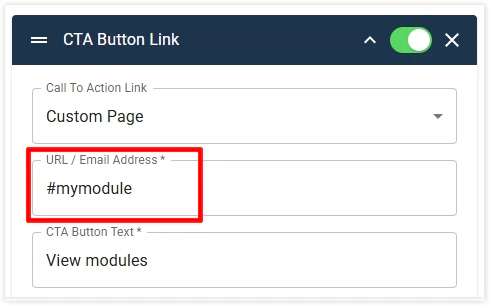
  5. CTA Buttons can now be used to link to on-page anchor link by just defining the anchor ID as shown below.

Improvements and Bug Fixes
  1. Testimonials Variant 3: Image and spacing fixes 
  2. Misc. Forms enhancements and fixes
    1. The issue with Tooltips displaying on mobile. 
    2. Product categories/Interest fields tree display issues. 
    3. Form labels of top fields cutting off in Fullscreen Content width.
 09 October 2025 
Improvements and Bug Fixes
  1. Fixed various Admin UI issues in the SPEX module. 
  2. Corrected the Copy Page published state behaviour. 
  3. Resolved an issue where text colours in Display Styles were not applied correctly for users without the site_builder_designer permission. 
  4. Fixed the Preview Pane not reflecting saved changes accurately. 
  5. Corrected Anchor link URLs generated for modules with numbers in their names. 
  6. The Authoring Modal now displays the correct design in the left preview pane. 
  7. Global Footer changes now appear immediately on live sites without requiring cache clearance. 
  8. Header Variant 2 > Logo: Fixed logo display on Retina/Hi-DPI screens. Small logos now scale correctly to fit the container. For best results, upload a high-resolution logo (minimum 800 px wide). 
  9. Updated all published URLs (as per attached sheet) to relative or live URLs, ensuring all live URLs include www.
 02 October 2025 
Improvements and Bug Fixes
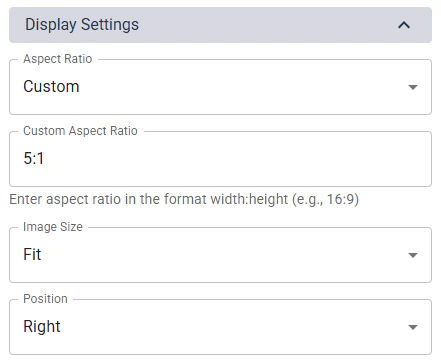
  1. On modules with images, Image Display Settings now shows the 'Position' dropdown when Image Size = Fill. Previously, it displayed only when 'Image Size' = 'Fit'. 
  2. Text Content: Removed 'Style > Content > Text Content Body' from Text Content module as there are multiple types of text styles in this editor (Regular, H1, H2, etc) which are now controlled from the Theme. 
  3. Text Content: Header Intro Text style not working on the module. 
  4. SPEX title always shown in English and not displaying correctly as per the locale.
  5. Misc. Localisation and Translation fixes. 
  6. Speaker logos alignment fix.
 25 September 2025 
New Module
  1. Modal – Modals can be setup under the new Modal section on the Site Builder landing page. There are 2 types of modals. Click the links below to view the demo:
Improvements and Bug Fixes
  1. Removed the default hover effect from Blocks in Drop Column, Column Text, and Speakers modules. Note: If the hover effect still appears, it may be caused by custom styling. Please reach out to your Core contact for adjustments.
  2. Pasting into editors within modules now strips all formatting from copied text, except hyperlinks.
  3. Updated tenants to include www in the sitemap.xml.
  4. Hotelmap - Fixed loading issue by adding the required code for compatibility with React UI.
  5. Custom Form module - Thank-you page URLs now work correctly on both Preview and Published environments. 
  6. Tiles with Navigation - Fixed issue where link text displayed incorrectly when wrapping to two lines.
 18 September 2025 
New modules and Features
  1. Table: The new responsive Table module delivers a cleaner, more intuitive experience with full mobile optimisation. Instead of forcing users to zoom or navigate oversized tables, the module reorganises content into a touch-friendly, scrollable structure. This is ideal for price comparisons, product matrices, and any content that relies on concise side-by-side data. Faster to build, easier to read, and far more engaging for users. For demo, click here.

  2. Tiles with Anchor Navigation: Tile-based module featuring automatic anchor links. Users can quickly jump between tiles through a menu at the top of the page, making long-form content easier to explore. Ideal for outlining steps, showcasing options, or promoting event experiences. For demo, click here.

  3. Module with images: New Aspect Ratio and Custom Aspect Ratio options added to better manage image sizing on the pages. 

Improvements and Bug Fixes
  1. Removing the pathname requirement for the primary event in multi-site tenants. This allows the parent site in multi-site tenants to be set up to load without /home in the URL
  2. Ad slot updates, as per the new Ad Slot Specifications, to standardise the Ad implementation on Site Builder 2.0. 
  3. Form: Enabled Hidden Fields on Form configuration to be sent to the Form payload, allowing Salesforce data capture.
  4. Text Content module: Font size for each Paragraph Format option in the text editor is defined from the Theme. Note: Text Module > STYLE > Content > Text Content Body > Text Style is redundant and will be removed
  5. Hotel Map base page: Added 'Display Page Title in the Page Body' to allow authors to show or hide the Page Title. 
  6. Footer > Social icons: Fixes spacing issue on Arabic site
 11 September 2025 
New Feature
  1. Relative URLs: Authors can now define relative URLs for hyperlinks and navigation so those links work across Preview, Published, and Live URLs. For demo, click here.
 04 September 2025 
New modules and Features
  1. Registration Options: Module for showcasing event pass options. Authors can display pricing, benefits, promotional offers, and registration buttons in a clean, user-friendly layout. Optimised for both desktop and mobile, this module helps streamline the registration journey. For demo, click here.

  2. Image module: A new Content Width option to display the image edge-to-edge of the screen. For demo, click here.

Improvements and Bug Fixes
  1. Forms > The Marketer Notification email: Improved the email template by listing additional data from most form fields and certain required values from the form configuration.


 28 August 2025 
New Variants and Features
  1. Testimonial module: new variants – Variant 2 and Variant 3 – each with a distinct design to display testimonials. 
  2. Image module: Option to place text on the bottom right of the image that can serve as a caption. For demo, click here.

Improvements and Bug Fixes
  1. Forms: Updated to allow multiple 'Nature of Business' fields to be placed on a single form.
  2. Engage Ads system is enabled on Core Site Builder 2.0.
  3. Form API Endpoint Update to improve and fix data capture. 
  4. Persisting UTMs across the pages. 
  5. Form Thank you page misc. fixes. 
  6. Form Localisation fixes made for gaps identified in the GDPR/Consent feature. 
  7. Alert Banner alignment fixes.

 21 August 2025 
New modules and Features
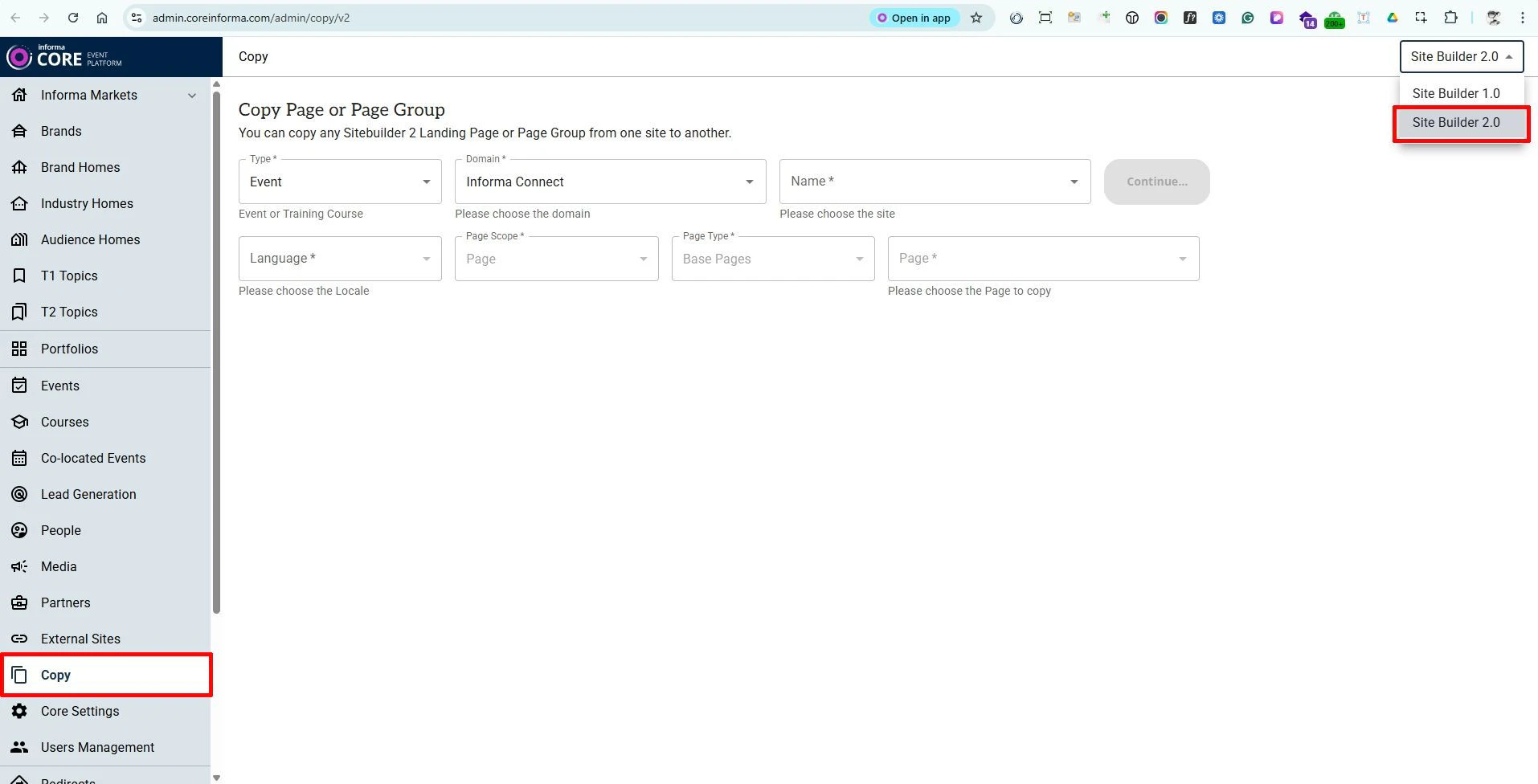
  1. Copy Tool: The Copy tool on Core now supports duplicating full pages - either within the same site or across other sites you have access to. The tool is available in the left-hand panel, outside of each Event (website). Click here to access the tool directly in the Production environment. - Note: When copying pages from Site Builder 2.0 sites, ensure that “Site Builder 2.0” is selected in the dropdown menu at the top-right of the Copy section.


  2. Pre Footer: The Pre-Footer is a configurable area that sits directly above the existing site footer and can contain any standard modules. Content placed here automatically appears across all pages of the website, allowing authors to create shared elements - such as sponsor logo lists - once and reuse them globally. The Pre-Footer can also be disabled at the page level if it should not appear on specific pages.


 14 August 2025 
New Variants and Features
  1. Hero Module, new variant: Variant 5 displays the image on the right or left of the text. 
  2. Hero Module, new Footer variant design to display module footer text in a coloured background.
 07 August 2025 
New modules and Features
  1. Navigation: Authors can now choose to hide the Home page from the main navigation
  2. Website Logo: A new configuration option lets authors set the logo height in the Header. 
  3. A new Header Alert feature is now available as part of the website Header. Authors can choose to display the alert either above or below the Header. For demo purposes, scroll up to view the banner positioned below the navigation. The banner can also be set to remain fixed (non-scrolling). 
  4. A new Countdown module has been added. For demo, click here
  5. Speakers Module, new variants - Variant 2 and Variant 3 are now available for the Speakers module, offering additional design options. Variant 3 also allows authors to highlight selected speakers using larger card designs. 
  6. CTA Button Group, new variant - A new design option (Variant 2) has been added to the CTA Button Group, displaying CTAs in a cleaner layout with each button separated by a dot.

Improvements and Bug Fixes
  1. Form – Interest Field: Resolved an issue where not all values were appearing in the list of values (LOV).
  2. Form – Consent Text: Corrected the event name displayed within the consent text.
  3. Form – Arabic Labels: Fixed alignment issues affecting field labels in Arabic.
  4. Form – Fields UI: Addressed various user interface display issues related to form fields.
  5. Text Wrapping: Corrected inconsistent or incorrect text wrapping across multiple components.
 July 2025 
New Modules and Features
  1. UTM Tracking: Cross-domain tracking with the new UTM Tracking feature.
  2. Exhibitor Listing: Showcase exhibitor details, sourced from MarketMakr.
  3. Copy Module Feature: Copy existing modules across the same or different pages of other 2.0 websites.
  4. Transcend Cookies Support: Full support for Transcend cookies on Site Builder 2.0 sites, ensuring compliance and better cookie management.

Improvements and Bug Fixes
  1. Theme Enhancements: Gradient colour codes are now validated before saving.
  2. Form Improvements:
    1. Various fixes for dark style forms and user interface corrections.
    2. Email validation added for ‘Mail To,’ ‘Mail CC,’ and ‘Mail BCC’ fields in the Marketer Notification tab, preventing errors during form setup.
    3. Helper text added to guide authors on saving email addresses correctly in the Marketer Notification tab.
  3. Image Uploads: Support for displaying WebP images when browsing for uploads on Windows, improving compatibility and user experience.